# IDMP Configuration

Vault can aggregate Identification of Medicinal Products (IDMP) data for you, offering a simple way to compile product data before submitting it to the European Medicines Agency (EMA). Vault uses a series of algorithms to compile existing submission data in your RIM Registrations Vault into the IDMP object structure.

RIM Registrations Vaults include all IDMP objects and the IDMP aggregation algorithm automatically. You must perform the configurations in this article for users to work with IDMP data. See [Generating IDMP Data](/en/lr/64159/) for detailed information about generating the IDMP elements.

<div class="note-border alert-info">
  <div class="alert alert-info" role="alert">
    <div><i class="far fa-info-circle"></i></div>
    <div class="alert-text">
      <p><strong>Note</strong>: This feature is only available on RIM Registrations Vaults. IDMP is an evolving functionality and we will continue to add features in future releases.</p>
    </div>
  </div>
</div>


## Configuration Overview

To set up IDMP data review:

  1. Configure the _Generate IDMP Records_ action on the _Regulatory Objective_ object lifecycle. See details about [configuring this action][32] below.
  2. Create an _IDMP Product Data Submission_ [object lifecycle](/en/lr/30683/) and associate it with the _IDMP Product Data Submission_ object.
  3. Configure the _Generate IDMP Elements_ [user action](/en/lr/59885/#user-actions) on the _IDMP Product Data Submission_ object lifecycle. You can't assign this action to the _Active_ state; instead you must create a new lifecycle state on which to add this action.
  4. Configure the necessary [object and object type page layouts][4].
  5. Set necessary [shared document fields][5] to _Active_ and associate them with any document types that you might use as attachments on the IDMP report.
  6. Load the necessary [controlled vocabulary files][6] to support IDMP data.
  7. Optional: Enable [IDMP and UDI accelerators][7]. These allow Vault to automatically generate related records for certain IDMP objects. We also recommend configuring the [_Link Packaging to MP-Registration_][8] action on the _Registered Packaging_ object lifecycle.
  8. Optional: [Configure][33] the _Pending Withdrawal_ lifecycle state type to allow Vault to exclude source records from IDMP data aggregation.
  9. Optional: Activate object types and configure object page layouts to support [regulatory text with multiple translations][35].
  10. Enable and configure [eAF output reports](/en/lr/5062581/) to allow users to generate variation and product reports for working with eAF web forms in the EMA portal, then view them in the [IDMP Viewer](/en/lr/76688/).
  11. Optional: Configure [FHIR message generation and export][36] 
  12. Optional: Configure [PMS submission][37] capabilities.
  13. Optional: Enable various [IDMP Viewer enhancements][38].

## Configuring IDMP Record Generation {#idmp-record-generation}

The _Generate IDMP Records_ action allows Vault to generate all IDMP data related to a _Regulatory Objective_ record's registrations at once. You can configure this as either a [user action](/en/lr/59885/#user-actions) or an [entry action](/en/lr/59885/#entry-actions) on _Regulatory Objective_ object lifecycle states. Do not configure this as an event action, or Vault will not be able to create records.

If you are configuring this as a user action, you must first [assign the _Generate IDMP Records_ object action](/en/lr/43127/) to the _Regulatory Objective_ and _Product Data Submission_ objects. Do not select the **Available in All Lifecycle States** checkbox when you assign the object action. Instead, we recommend configuring user actions such that:
* On the *Regulatory Objective* lifecycle's *Planned* state, users can only execute it when the *Application Region* equals "European Union" and the *Applicable Product Type* equals "Drug".
* On the *Regulatory Objective* lifecycle's *In Progress State*, the *Applicable Product Type* equals "Drug".
* On the *Product Data Submission* lifecycle's *Planned* state, users can always execute the action.

In order for this action to run successfully, you must also:

* [Assign the _IDMP Job ID_ field](/en/lr/32857/#assign) to the _Regulatory Objective_ object's _Regulatory Objective_ object type.
* Ensure that there are no required fields configured on the _IDMP Product Data Submission_ object.

## Object Page Layouts {#page-layouts}

The RIM data model is periodically updated to better support evolving IDMP needs and new feature functionality.

For the 24R3 release and earlier, many of these changes were incorporated into a configuration workbook as a resource for aligning RIM Vaults to the IDMP data model. This workbook and its instructions are preserved below, covering updates for applicable releases from the 20R3 general release through the 24R3 general release.

As of 25R1, this workbook is no longer maintained. Instead, RIM Vault Admins should consult that release's [Data Model Documentation](/en/lr/777859/) workbook in <a class="external-link " href="https://rn.veevavault.help/en/gr/about-the-26r1-release/#veeva-connect-communities" target="_blank" rel="noopener">Veeva Connect<i class="fa fa-external-link" aria-hidden="true"></i></a> to assess any IDMP-specific RIM data model updates.

### 24R3 General Release & Earlier

<div class="note-border alert-info">
  <div class="alert alert-info" role="alert">
    <div><i class="far fa-info-circle"></i></div>
    <div class="alert-text">
      <p><strong>Note</strong>: This workbook is no longer maintained as of the 25R1 general release.</p>
    </div>
  </div>
</div>


The <a class="download-link " href="https://platform.veevavault.help/assets/downloads/IDMP-Data-Model-Object-Page-Layout-Configuration-Workbook-LEGACY-25R1.xlsx" target="_blank" rel="noopener">IDMP data model object page layout configuration workbook<i class="fa fa-download" aria-hidden="true"></i></a> details the [object page layout](/en/lr/26387/) configurations available to align your Vault to the IDMP data model in 24R3 and earlier.

The **Related Object Sections** tab details the source object page layouts requiring related output object sections. The **Object Fields** tab details which fields you can add to or remove from the indicated object's page layout.

In both tabs, you can also:
* Consult the **Additional Instructions** column for configuration considerations, which can include information about the fields Vault automatically adds to object page layouts.
* Filter the **Release** column to determine when a given component was added or last updated.

The **Object Fields** tab also details whether an object contains source or output data, as this may determine your organization's configuration requirements. If your organization's data management strategy requires submission data to be edited at the source, you may consider omitting term and term text fields from the corresponding output records, such as _Legal Basis Term_ and _Legal Basis Term Text_ from the _IDMP Classification System_ object.

### About the Use for XEVMPD/IDMP Field {#use-for-xevmpd-idmp}

In some situations, you may want Vault to ignore certain _Country Language_ records related to the submission when generating IDMP data.
When this field is configured on the _Country Language_ object page layout, users can indicate that Vault should ignore specific records by setting the _Use for XEVMPD/IDMP_ field to _No_ on each _Country Language_ record. When the field is blank or set to _Yes_, Vault includes the record when generating IDMP data.

### Supporting Regulatory Text with Multiple Translations {#supporting-regulatory-text-with-multiple-translations}

<div class="note-border alert-info">
  <div class="alert alert-info" role="alert">
    <div><i class="far fa-info-circle"></i></div>
    <div class="alert-text">
      <p><strong>Note</strong>: The <em>Product Variant Description</em> object types <em>Device Intended Use</em> and <em>Device Description</em> related to this function are no longer needed as of 23R3.</p>
    </div>
  </div>
</div>


The IDMP data aggregation algorithm supports regulatory text records with multiple translations. To configure this in your Vault, we recommend the below configuration.

1. Review the [object page layout configuration workbook][4] and configure the **Related Object Section** and **Object Field** configurations for supporting regulatory text with multiple translations. You can find them by filtering the **Release** column to 23R3 and reviewing the **Additional Instructions** column.
2. Ensure the _Device Description_, _Device Trade Name_, and _Device Intended Use_ object types are active within the below objects, then create a corresponding page layout for each:
    * _Regulatory Text_
    * _Regulatory Text Translation_
    * _Event Regulatory Text_
    * _Application Regulatory Text_
    * _Submission Regulatory Text_
    * _Regulatory Objective Regulatory Text_
    * _Registered Regulatory Text_
3. Optional: Configure a **Regulatory Text** tab to allow users to view _Regulatory Text_ object records.

## Shared Document Fields {#document-fields}

Set the following [shared document fields](/en/lr/4884/) to _Active_ and associate them with any document types that you might use as attachments on the IDMP element:

  * _IDMP Document Type_
  * _IDMP Effective Date_
  * _IDMP File Type_
  * _IDMP PMS ID_
  * _IDMP PMS URL_
  * _Medicinal Product_

## Controlled Vocabularies {#vocabularies}

Vault uses _Controlled Vocabulary_ records to populate certain fields on _IDMP Product Data Submission_ records. These records must be in place before users can begin the IDMP data collection and review process.

RIM Registrations Vaults include *Controlled Vocabulary* records as part of the Veeva Services implementation process. Once established, *Controlled Vocabulary* records for use in IDMP should be maintained using the [EMA RMS Integration](/en/lr/67449/). Generally, these records must have the appropriate *SPOR Term* and *SPOR Referential ID *(`spor_rms_id__v`) field values to ensure that Vault can determine critical aggregation and validation criteria.

Vault supports *Controlled Vocabularies* for all types available within the *Controlled Vocabulary Type* picklist. Veeva periodically delivers new standard types via documented [data model changes](/en/lr/777859/) for a given release.


<div class="note-border alert-info">
  <div class="alert alert-info" role="alert">
    <div><i class="far fa-info-circle"></i></div>
    <div class="alert-text">
      <p><strong>Note</strong>: When a <em>Controlled Vocabulary</em> record does not include <em>SPOR Term</em> and <em>SPOR Referential ID</em> (<code class="language-plaintext highlighter-rouge">spor_rms_id__v</code>) field values, users generating IDMP records receive <a href="/en/lr/64159/#generating-idmp-records">configuration errors</a> in the resulting CSV file. These errors may be referencing either the record’s missing SPOR data, or the absence of the <em>SPOR Term</em> at the source.</p>
    </div>
  </div>
</div>


### Centralised Procedure Controlled Vocabulary Requirements

To ensure that Vault can generate IDMP elements correctly and [automatically create][7] _Medicinal Product_ and _Medicinal Product Registration_ records, you also need to update the _Centralised Procedure_ controlled vocabulary:

1. Navigate to **Admin > Business Admin > Controlled Vocabularies**.
2. Search to find the **Centralised Procedure** _Controlled Vocabulary_ record in the grid.
3. Select **Edit Columns** from the grid's **Actions** menu and add the **SPOR RMS ID** and **Veeva RIM UUID** fields as columns.
4. Using [inline editing](/en/lr/31019/), set the **SPOR RMS ID** field to **100000155059**. Set the **Veeva RIM UUID** field to **7aa0df44-87b9-4309-91a5-20185cdd2415**.

## Enabling IDMP Accelerators {#accelerators}

To enable IDMP accelerators, navigate to **Admin > Settings > Application Settings** and set the **Enable IDMP and UDI Accelerators** checkbox. Then, select the checkboxes for the accelerators that you want to enable:
* **Automatically Generate Medicinal Product Records**: When users create new _Marketed Drug Product Registration_ records, Vault automatically creates related _Medicinal Product_ and _Medicinal Product Registration_ records. After setting this checkbox, select:
  * The **Regions** for which Vault should create records, for example, _European Union_.
  * The appropriate **Lead Market Field**, or the _Application_ object field that indicates the rapporteur for centralised procedures.
  * Any **Eligible Registration Types** for which Vault should create records. This subsetting is optional and can be used according to your organization's requirements, such as for animal health products. This functionality is not currently intended for investigational products and will be supported in a future release.
* **Automatically Generate Registered Packaged Product Records**: When users create certain related records, Vault automatically creates _Registered Packaged Medicinal Product_ records.
* **Automatically Generate Registered Site Role Records**: When users create certain related records, Vault creates _Registered Site Role_ records automatically.
* **Automatically Generate Alias Records**: When users create _Active Substance_ or _Inactive Ingredient_ records, Vault automatically creates a corresponding _Active Substance Alias_ (`active_substance_translation__v`) or _Inactive Ingredient Alias_ (`inactive_ingredient_translation__v`). You can use the [RIM Maintenance](/en/lr/44812/) tab to extract existing _Active Substance_ and _Active Ingredient_ records, then load new alias records. The tab also supports extracting and loading _Product Manufactured Dosage Form_ records based on existing active _Product_ records' _Manufactured Dosage Form_ field.

[System-managed naming](/en/lr/30986/) must be configured on the following objects in order for you to enable their corresponding accelerator:
  * _Active Substance Alias_ (`active_substance_translation__v`)
  * _Inactive Ingredient Alias_ (`inactive_ingredient_translation__v`)
  * _Medicinal Product_
  * _Medicinal Product Registration_
  * _Registered Packaged Medicinal Product_
  * _Registered Site Role_

See [Generating IDMP Data](/en/lr/64159/#record-creation) for details about record creation. If you have any mandatory fields on these objects, they must have a default value defined or record creation will fail.

### Enabling Medicinal Product Registration Mapping {#mp-mapping}

After you enable the [_Automatically Generate Medicinal Product Records_](/en/lr/53688/#auto-generate-MP) IDMP accelerator, we recommend configuring the _Link Packaging to MP-Registration_ action as a [user action](/en/lr/59885/#user-actions) or an [entry action](/en/lr/59885/#entry-actions) on _Registered Packaging_ object lifecycle states. This action maps _Registered Packaging_ records to related _Medicinal Product Registration_ records.

If you are configuring this as an entry action, do not configure the action on the _Starting_ state, or bulk record creation issues could occur. If you are configuring this as a user action, you must first [assign the _Link Packaging to MP-Registration_ object action](/en/lr/43127/#assign-actions) to the _Registered Packaging_ object. Do not select the **Available in All Lifecycle States** checkbox when you assign the object action.

## Configuring the Pending Withdrawal State Type {#configuring-the-pending-withdrawal-state-type}

Using the _Pending Withdrawal_ [state type](/en/lr/30683/#state-type), you can configure various registered details object lifecycles to exclude records from the IDMP data aggregation algorithm. This can be useful, for example, when a _Registered Active Substance_ record is in the process of being withdrawn but whose withdrawal is not yet complete, or when a registered detail's _Full Indication Text_ was submitted for update but is not yet approved.

To configure this:
  1. Review your Vault's available object lifecycles, then create a lifecycle for any of the desired registered details objects which do not already have one.
  2. Within the source object lifecycle, confirm or create the lifecycle state your organization uses to indicate a record is being withdrawn. We recommend using a _Pending Withdrawal_ label to match the state type.
  3. Map the new or existing lifecycle state to the _Pending Withdrawal_ state type.
  4. Where required, configure the source object lifecycle to allow Vault or Vault users to move the source object record to the state mapped to the _Pending Withdrawal_ state type. For example, you can add a manual [user action](/en/lr/59885/#define-actions) to move _Registered Active Substance_ records in the _Planned_ state to the _Pending Withdrawal_ state. Ensure your chosen method aligns with any existing object lifecycle logic.

## Configuring FHIR Message Generation & Export {#fhir-message-generation-and-export}

Vault can generate discrete messages in accordance with the Fast Healthcare Interoperability Resources (FHIR) standard by transposing product data in a *PDS Medicinal Product Element* and its related records into a XML structure. Once generated, Vault stores the output in the Vault Library under the _IDMP > EU IDMP Submission_ subtype. When [configured][37], Vault additionally supports sending generated in Vault directly to PMS.

Vault supports [generating](/en/lr/64159/) and [exporting](/en/lr/64159/) FHIR messages individually from a *Product Data Submission* record, or in bulk from a *Regulatory Objective*. 

### Controlled Vocabularies for FHIR Version Support {#fhir-cv}

Vault generates FHIR messages using FHIR v5.0.0 only. Similarly, the IDMP Viewer only displays complete comparison data for FHIR v5.0.0. See [additional details](/en/lr/48830/#fhir-version-support) about FHIR version support. 

FHIR versions are reflected in your Vault's *Controlled Vocabulary* records of the *FHIR Message Version* type. Vault populates this version within the *EU IDMP Submission* document's *FHIR Message Version* field, which allows IDMP Viewer users to select the message from the **Data View Selection** dialog's **Compare Data** dropdown.

### Individual Generation & Export

To configure individual FHIR message generation and export:

1. Ensure the *IDMP* > *EU IDMP Submission* document type is active.
2. Within the *Product Data Submission* object, [assign](/en/lr/43127/#assign-actions) the *Generate FHIR Message* object action. During configuration, do not select the *Available in All Lifecycle States* configuration option.
3. Within the *Product Data Submission* lifecycle, create a "Generate FHIR Message" user action referencing the new action. We recommend configuring the action such that users can always execute it from the lifecycle's *Planned* state.
4. Review your Vault's security configuration and ensure users generating FHIR messages are assigned the appropriate [permissions][9]. Generally, users performing the _Generate FHIR Message_ action can only generate XML for the PDS output objects to which they have _Read_ permission.


### Bulk Generation & Export

To configure bulk FHIR message generation and export:

1. Within the *Regulatory Objective* object, [assign](/en/lr/43127/#assign-actions) the *Bulk Create FHIR Messages* and *Bulk Export FHIR Messages* object actions. During configuration, do not select the *Available in All Lifecycle States* configuration option.
2. Within the *Regulatory Objective* lifecycle, create two new "Bulk Create FHIR Messages" and "Bulk Export FHIR Messages" user actions referencing the new actions. We recommend configuring the actions such that users can execute them from the *In Progress* state when the *Application Region* equals "European Union" and the *Applicable Product Type* equals "Drug".
3. Review your Vault's security configuration and ensure users generating FHIR messages are assigned the appropriate [permissions][9]. Generally, users performing the bulk actions can only generate XML for the PDS output objects to which they have _Read_ permission.

## Configuring FHIR Message Submission to PMS {#fhir-message-submission}

With additional Vault configuration, PMS connection setup, and baselining of IDMP records, certain submissions generated in Vault can be submitted individually or in bulk directly from Vault to PMS.


<div class="note-border alert-info">
  <div class="alert alert-info" role="alert">
    <div><i class="far fa-info-circle"></i></div>
    <div class="alert-text">
      <p><strong>Note</strong>: This feature currently supports manufacturing and pack size enrichment submissions only.</p>
    </div>
  </div>
</div>


### General Configuration

1. Add the *Submission Status* field to the *Product Data Submission* object page layout (`idmp_product_data_submission__v`). We additionally recommend configuring security for this field such that only a Vault Admin or other higher-level users can edit it. Vault uses this picklist's values to control various aspects of this feature (including the actions available to users), and therefore most users should not be able to edit it, however some editability should be maintained for troubleshooting purposes.
2. Assign this feature's object actions to the indicated objects:
    * *Product Data Submission* object: *Submit FHIR Message* and *Update Submission Status* actions
    * *Regulatory Objective* object: *Bulk Submit FHIR Messages* action
3. Within the *Product Data Submission*'s assigned lifecycle, navigate to the existing **Create Record** Event Action. Then, create a new event action such that Vault always updates the *Submission Status* field to "Not Submitted" when a record is created.
4. Within the _Connection Mapping_ object, activate the _PMS Version_ field, then add it to the object page layout.
5. Recommended: Inactivate the *IDMP Submission Mode* picklist's *eCTD* (`ectd__v`) value. This step is recommended to insure against inaccurate data entry.
6. Enable the appropriate [IDMP Viewer Enhancement][38] setting for viewing PMS data in the IDMP Viewer.


<div class="note-border alert-info">
  <div class="alert alert-info" role="alert">
    <div><i class="far fa-info-circle"></i></div>
    <div class="alert-text">
      <p><strong>Note</strong>: The <em>Product Data Submission</em> object’s <em>FHIR Submission URL</em> field supports FHIR message submission response handling only. This field does not require configuration on the object page layout.</p>
    </div>
  </div>
</div>


### PMS Connection Setup

When a Marketing Authorization Holder (MAH) registers for SPOR API access, the EMA returns application registration details. You'll use these details to establish your Vault's connection with PMS.

1. Navigate to **Business Admin > Objects** and create a _Connection Mapping_ record with the required details.
2. Navigate to **Admin > Connections > Connection Authorizations** and create a new Client Credential record. Populate the **Name** according to your organization's requirements, and the **Client ID** and **Client Secret** field details according to the EMA-provided details.
3. Navigate to **Admin > Connections** and create a new External connection record. Then, populate fields accordingly.
    * The connection's **Name** (for example, "PMS Connection"), **API Name** (for example, `spor_pms_api`), and optional **Description** can be populated according to your organization's requirements.
    * Set the **URL** to `https://spor.azure-api.net/pms/api/v3`
    * Select the connection **Authorization** record you created in Step 1.
    * Do not select an **Authorized Connection User**.

### Configuration for Baselining IDMP Records 

To support the enrichment process, IDMP records must first be [baselined](/en/lr/48830/#baselining), or populated with all critical PMS identifiers such as the *PMS ID*, pack-level *PMS ID*, *PCID*, and *MPID* to RIM via the SPOR API. This process maps and updates the returned identifiers to the *Medicinal Product* and related *Registered Packaged Product* records, based on the *Medicinal Product* record's *EV Code*.

To configure this capability:

1. Within the *Medicinal Product* object, create two new object actions using the *Populate PMS Identifiers* and *Bulk Populate PMS Identifiers* actions. During configuration, do not select the *Available in All Lifecycle States* configuration option.
2. Within the *Medicinal Product* object lifecycle, configure the *Populate PMS Identifiers* and *Bulk Populate PMS Identifiers* actions as user or entry actions, according to your organization's requirements.
    * When configured as an entry action, Vault can continuously sync identifiers with new records as they are created.
    * Both actions should be configured such that it is only executed when the *Medicinal Product* record's *Authorisation Type* equals *Authorised Medicinal Product*. As part of this configuration, ensure the referenced *Authorised Medicinal Product* (*Controlled Vocabulary* record) has a *Veeva RIM UUID* value of 5571e70a-8b16-42cb-924a-1f2d9d3eb41b. This is because PMS is currently limited to marketed medicinal products.
3. Ensure your Vault contains the following operation- or procedure-type *Controlled Vocabulary* records (where *Controlled Vocabulary Type* is "Operation Type" or "Procedure Type") with the appropriate *Veeva RIM UUID* values:
    * One "Manufacturer and Pack Size Enrichment" operation type record with a *Veeva RIM UUID* value of 5990d2f0-338f-4169-bf80-0bab69a7ad56
    * One "Full Data Set" operation type record with a *Veeva RIM UUID* value of a2fb662e-01b5-4af7-8e3b-5240ac6a7946
    * One "Centralised Procedure" procedure type record with a *Veeva RIM UUID* value of 7aa0df44-87b9-4309-91a5-20185cdd2415

## Enabling IDMP Viewer Enhancements {#idmp-viewer-enhancements}

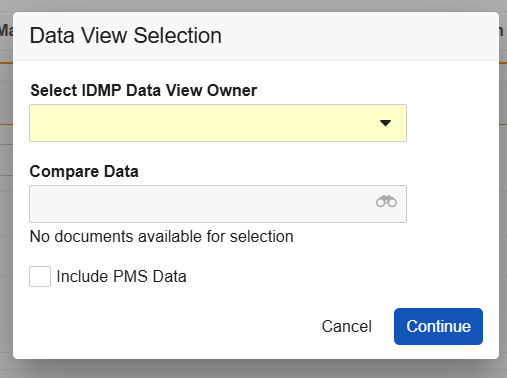
You can enable various IDMP Viewer enhancements via **Admin > Settings > Application Settings**. Each enhancement corresponds to an option for user selection within the IDMP Viewer's **Data View Selection** dialog that appears upon running the *Generate IDMP Data View* action.

<a href="https://platform.veevavault.help/assets/images/idmp-viewer-data-view-selection.png" data-lightbox="idmp-viewer-data-view-selection.png" data-title="" data-alt="data view selection dialog">
  <img class="docimage" src="https://platform.veevavault.help/assets/images/idmp-viewer-data-view-selection.png" alt="data view selection dialog" style="max-width: 50%;"  />
</a>

To enable any enhancement, you must first select the **Enable IDMP Viewer Enhancements** option, then select the desired subsetting(s). In most cases, subsettings can be enabled independently or together.

* **Prompt for IDMP Viewer User**: When enabled, users executing the *Generate IDMP Data View* action can select a single user to send a notification to a specific [**Data View Owner**](/en/lr/76688/#about-the-data-view-owner), with a user-specific link to an IDMP Viewer session. When disabled, the notification is sent to the user executing the action.
* **Prompt for FHIR Message Selection in IDMP Viewer**: When enabled, the viewer prompts users to select whether they'd like to include FHIR messages for comparison in the viewer via the dialog's **Compare Data** dropdown.
* Two PMS-specific settings determine the dialog's **Include PMS Data** default checkbox selection: The **Default IDMP Data View to Include PMS Data** setting automatically selects this checkbox, meaning Vault includes PMS data in the IDMP data view by default, unless the user deselects the checkbox (opts out). Otherwise, **Enable PMS Data in the IDMP Viewer** requires viewer users to select the checkbox (opt in) each time they generate a view.


## Related Permissions {#related-permissions}

Users generating IDMP data must be assigned a permission set with _Read_, _Create_, and _Edit_ permissions for the following objects:
* _IDMP Grouping_
* _Medicinal Product_
* _Product Data Submission_ (`idmp_product_data_submission__v`)
* All [IDMP (PDS) element objects][10]

Generally, a user's ability to work with IDMP data is based on object and object field permissions. This includes permission to view both lookup fields and the field it references. For example, when a user has _Read_ permission for the _PDS Medicinal Product Element_ object's _Domain Code_ and _Domain Term_ fields, but does not have permission for the _Domain_ field, Vault does not populate the _Domain_ field.

### PDS Element Objects {#pds-elements}

As of 25R3, Registrations Vaults include the following PDS element objects:

  * _PDS Admin Ingredient Manufacturer_ (`idmp_admin_ingredient_manufacturer__v`)
  * _PDS Admin Product Ingredient Element_ (`idmp_admin_product_ingredient_element__v`)
  * _PDS AP Reference Strength_ (`idmp_ap_reference_strength__v`)
  * _PDS Attachment_ (`idmp_attachment__v`)
  * _PDS Attachment Language_ (`idmp_attachment_language__v`)
  * _PDS Authorised Pharmaceutical Form_ (`idmp_authorised_pharmaceutical_form__v`)
  * _PDS Classification System_ (`idmp_classification_system__v`)
  * _PDS Component_ (`idmp_component__v`)
  * _PDS Component Material_ (`idmp_component_material__v`)
  * _PDS Container_ (`idmp_container__v`)
  * _PDS Container Data Carrier_ (`idmp_container_data_carrier__v`)
  * _PDS Container Material_ (`idmp_container_material__v`)
  * _PDS Container Reference Item_ (`idmp_container_reference_item__v`)
  * _PDS Device Description_ (`idmp_device_description__v`)
  * _PDS Device Manufacturer_ (`idmp_device_manufacturer__v`)
  * _PDS Ingredient Master File_ (`idmp_ingredient_master_file__v`)
  * _PDS Manuf. Item Ingredient Manufacturer_ (`idmp_manuf_item_ingredient_manufacturer__v`)
  * _PDS Manuf. Item Ingredient Master File_ (`idmp_manuf_item_ingredient_master_file__v`)
  * _PDS Manufactured Item_ (`idmp_manufactured_item__v`)
  * _PDS Manufactured Item Description_ (`idmp_manufactured_item_description__v`)
  * _PDS Manufactured Item Ingredient_ (`idmp_manufactured_item_ingredient__v`)
  * _PDS Manufacturing Site_ (`idmp_manufacturing_site__v`)
  * _PDS Marketing Authorisation Element_ (`idmp_marketing_authorisation_element__v`)
  * _PDS Master File_ (`idmp_master_file__v`)
  * _PDS Medicinal Product Element_ (`idmp_medicinal_product_element__v`)
  * _PDS Medicinal Product Full Name_ (`idmp_medicinal_product_full_name__v`)
  * _PDS Medicinal Product Indication_ (`idmp_medicinal_product_indication__v`)
  * _PDS Name Part_ (`idmp_name_part__v`)
  * _PDS Pack Size_ (`idmp_pack_size__v`)
  * _PDS Package Authorisation Status_ (`idmp_package_authorisation_status__v`)
  * _PDS Package Description_ (`idmp_package_description__v`)
  * _PDS Package Manufacturer_ (`idmp_package_manufacturer__v`)
  * _PDS Package Marketing Status_ (`idmp_package_marketing_status__v`)
  * _PDS Packaged Medicinal Product Element_ (`idmp_packaged_medicinal_product_element__v`)
  * _PDS Pharmaceutical Product Description_ (`idmp_pharmaceutical_product_description__v`)
  * _PDS Pharmaceutical Product Element_ (`idmp_pharmaceutical_product_element__v`)
  * _PDS Product Cross Reference_ (`idmp_product_cross_reference__v`)
  * _PDS PV Reference Strength_ (`idmp_pv_reference_strength__v`)
  * _PDS Regulatory Authorisation_ (`idmp_regulatory_authorisation__v`)
  * _PDS Route of Administration_ (`idmp_route_of_administration__v`)
  * _PDS Shelf Life_ (`idmp_shelf_life__v`)
  * _PDS Storage Precaution_ (`idmp_storage_precautions__v`)
  * _PDS Therapeutic Indication Element_ (`idmp_therapeutic_indication_element__v`)

 [4]: #page-layouts
 [5]: #document-fields
 [6]: #vocabularies
 [7]: #accelerators
 [8]: #mp-mapping
 [9]: #related-permissions
 [10]: #pds-elements
 [32]: #idmp-record-generation
 [33]: #configuring-the-pending-withdrawal-state-type
 [34]: #idmp-admin-product-ingredient-element-source-objects
 [35]: #supporting-regulatory-text-with-multiple-translations
 [36]: #fhir-message-generation-and-export
 [37]: #fhir-message-submission
 [38]: #idmp-viewer-enhancements
