# Active Dossier Configuration (RIM)

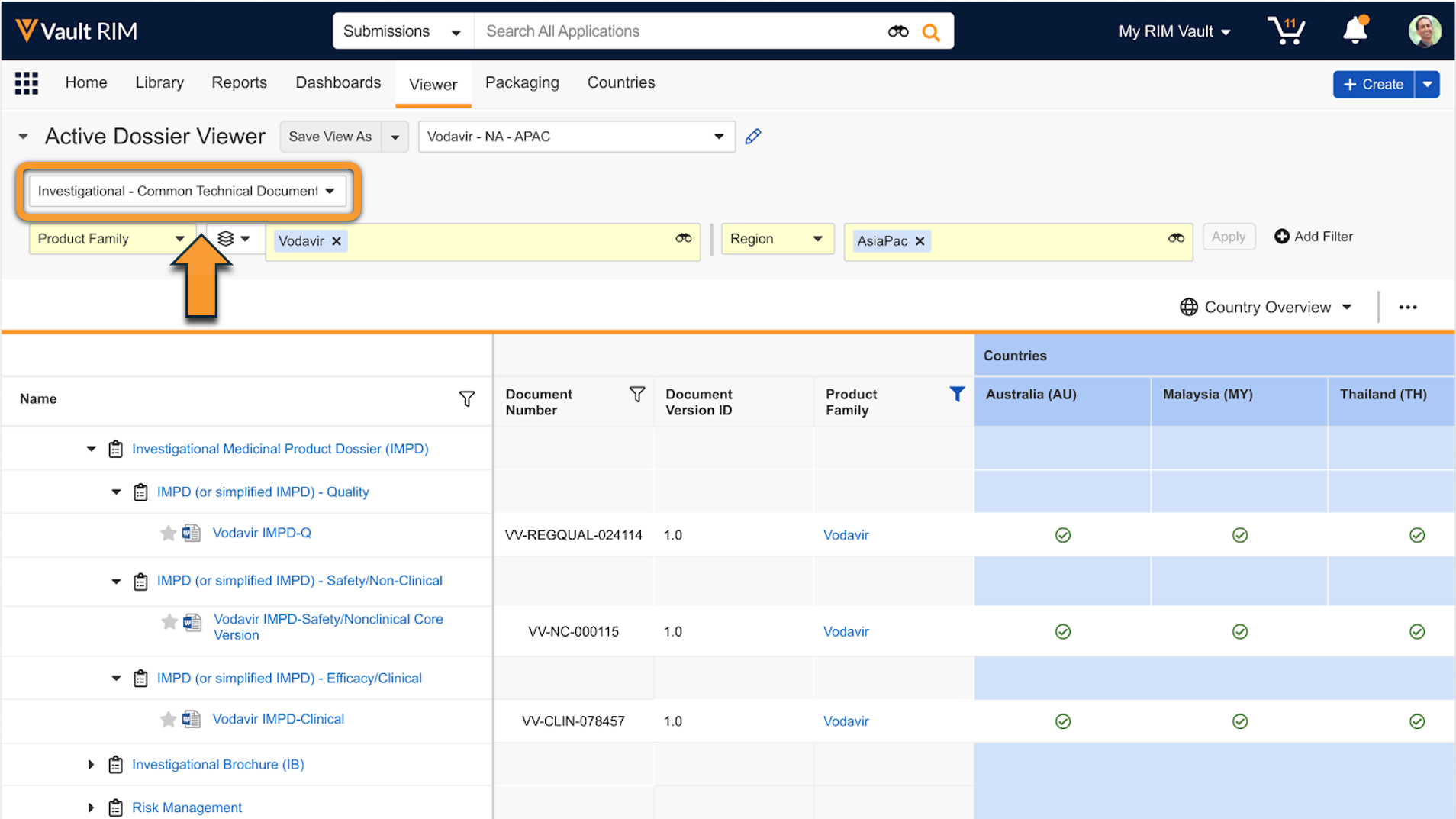
RIM Submissions and RIM Submissions Archive Vaults include the Active Dossier structure to help sponsors maintain a list of current documents for a given product and market. Users can view the Active Dossier in a designated tab to see a document's status across multiple markets.

When configured, Vault can automatically populate the Active Dossier based on changes to _Submission_ and _Regulatory Objective_ records:

  * When a _Submission_ record moves to final states such as _Health Authority Received_ or _Archived_ state, Vault can automatically create and update _Active Dossier Item_ and _Active Dossier Item Detail_ records. _Active Dossier Structure_ records may be created for newly-added _Active Dossier Items_.
  * When a _Regulatory Objective_ record moves to the _Health Authority Approved_, _Rejected_, _Withdrawn_, or _On Hold_ states, Vault can automatically update _Active Dossier Item_ and _Active Dossier Item Detail_ records for all related submissions.

You can also [configure][18] Vault to generate [Active Dossier](/en/lr/71782/) records from a [Global Content Plan dispatch](/en/lr/77853/).

<div class="note-border alert-info">
  <div class="alert alert-info" role="alert">
    <div><i class="far fa-info-circle"></i></div>
    <div class="alert-text">
      <p><strong>Note</strong>: This feature is only available in Vaults licensed for both RIM Submissions and RIM Submissions Archive. Active Dossier generation from Global Content Plan Dispatch requires a license for RIM Registrations.</p>
    </div>
  </div>
</div>


## Active Dossier Objects & Components

The following objects support the Active Dossier and capture the structure, product-related metadata, and the status of a specific document within a given market or country:

  * **Active Dossier Template** contains the template outline of the Active Dossier. _Active Dossier Template_ records are provisioned and maintained by Veeva. Users can only edit the _Status_, _Document Type_, and _Reference Model_ fields on these records. Vault supports a limited set of _Active Dossier Template_ records within the Common Technical Document (CTD).
  * **Active Dossier Structure** contains the outline of the Active Dossier built based on metadata and the _Active Dossier Template_. Vault creates these records automatically based on the tokens specified in the _Active Dossier Template_ records and unique combinations related object reference fields. For example, Vault creates a "3.2.S Drug Substance - Wondersubstance" _Active Dossier Structure_ record for _Active Dossier Item_ records with "Wondersubstance" as the _Active Substance_.
  * **Active Dossier Item** captures each individual source document and version and the current state of the document per country, as well as the product information metadata. Users cannot edit the _Country_ or any fields related to the document.
  * **Active Dossier Item Detail** is a child object of _Active Dossier Item_ that captures the in-progress state and additional context of the document in a specific country. This includes the regulatory transaction related references such as the _Application_, _Regulatory Objective_, _Submission_, _Event_, and _Activity_. It also captures additional documents related to the instance of the document for the country, such as the _Submissions Archive Document_ and _Translation Document_. Users cannot edit the _Country_, product information fields, or any fields related to the document.
  * **Active Dossier Loader** is a [raw object](/en/lr/62987/) available for creating Active Dossier records for migration purposes. To expedite the initial migration in your Vault, you can use Vault Loader to load records of this object to quickly create _Active Dossier Item_, _Active Dossier Item Detail_, and _Active Dossier Structure_ records in bulk. See [Loading Active Dossier Records][11].

### Active Dossier Objects for Registration & Product Information Tracking

The _Active Dossier Item Detail_ object is related to the below objects, which Registrations customers can use to provide users a more granular view of the Active Dossier based on the _Registration_ and select product information details. When [configured][20], Vault automatically creates _Active Dossier Item Detail_ relationship records for _Registrations_, _Product Variants_, _Manufacturers_, and _Inactive Ingredients_ based on matching fields between related _Registrations_, _Active Dossier Item Details_, and document metadata.
  * _AD Item Detail Inactive Ingredient_
  * _AD Item Detail Manufacturer_
  * _AD Item Detail Product Variant_
  * _AD Item Detail Registration_

These relationships are surfaced in the Active Dossier Viewer and are editable in the Active Dossier Editor. When you edit these relationships, Vault prompts you to enter a Reason for Change. This ensures manual edits are captured in the audit trail, and aligns this workflow with other standard editing flows within Active Dossier.

## Configuration Overview

  1. Activate the **Active Dossier** tab and [reorder it to be a sub-tab](/en/lr/23516/) of the **Product** tab.
  2. Activate and configure the _Edit Active Dossier_ and _View Active Dossier_ actions. See details about [configuring these actions][6] below.
  3. Create an object workflow that allows Vault to generate _Active Dossier_ records when submission creation completes. See details about [object workflow configuration for submissions][7] below.
  4. Review your Vault's _Submission_ object lifecycle configuration. Add a [_Start Workflow_ entry action](/en/lr/59885/#entry-actions) for the **Generate AD records from Submissions** workflow on the _Health Authority Received_ state, and for any lifecycle states where records should be generated, for example, the _Archived_ state.
  5. Review your Vault's _Regulatory Objective_ object lifecycle configuration. Add an [Update Active Dossier entry action] [19] on the _Health Authority Approved_ state, and any lifecycle states where the status and optionally the Approval Type of related Active Dossier records should be updated, for example Rejected, Withdrawn, or On Hold.
  6. Update the _Regulatory Objective_ [object page layout](/en/lr/26387/) to add a related object section for the _Active Dossier Item Details_ object.
  7. Update _Active Dossier Template_ records to populate the _Document Type_ field or the _Reference Model_ field. Optionally, you can edit and add templates according to your organization's needs. See details about [updating the Active Dossier Template][1] below.
  8. Review your Vault's [security configuration][16] to ensure users can view and create Active Dossier records, as well as execute actions.
  9. Review your Vault's *Country* records and ensure all records for supported countries have a unique and valid *Country Code* (`country_code__rim`).
     * Active Dossier only supports specific *Country Codes* and ignores any countries with an invalid or blank *Country Code*. For example, "AU" is the *Country Code* for the *Country* Australia.
     * Supported countries are reflected in the *Active Dossier Item* object's standard, country-specific fields, for example, *Australia (AU)* (`country_au__v`). You can find all supported fields by navigating to **Admin > Configuration > Objects > Active Dossier Item > Fields**.
  10. Review your Vault's _Country Language_ records, and create any records for countries and languages where translations are expected. Active Dossier relies on these records for tracking  [translation documents](/en/lr/71673/#viewing-country-status).
  11. Recommended: Activate the _Incorrect Document Type_ value in the _Active Dossier Update Reason_ picklist. Depending on your organization's requirements, you may also consider creating additional picklist values.
  12. Optional: Load active dossier records using Vault Loader. This step is recommended if your organization plans to migrate dossier information from an existing custom solution or an external system for tracking current documents in Vault. See [Loading Active Dossier Records][11].
  13. Optional: [Configure][18] your Vault to generate [Active Dossier](/en/lr/71782/) records from a [Global Content Plan dispatch](/en/lr/77853/).
  14. Optional (Registrations only): Configure [Active Dossier Registration & Product Information Tracking][20].

## Application & Submission Country Exclusion

Vault allows you to exclude specific countries from automated Active Dossier Item Detail (ADID) creation using the _Exclude from Active Dossier Generation_ field. 

If the Country’s (country__v) Exclude from Active Dossier Generation = Yes, then ADIDs will never be created for the Country when it is a Submission Country. 

If the Country’s (country__v) Exclude from Active Dossier Generation = No or blank and the Submission Country’s  Exclude from Active Dossier Generation = Yes, ADIDs are not created for that Country and Submission. If the Submission Country is No or blank, ADIDs are created. 

If the _Automatic Creation of Submission Country Records_ setting is enabled in Application Settings, values set on Application Country default to Submission Country. 

The Exclude from Active Dossier Generation field on Application Country can also be defaulted based on the Application’s Procedure Type by using Procedure Type Country Constraints. When an Application Country is created, if the Country’s _Exclude from Dossier by Constraint_ field is set to Yes, it compares the Application’s Procedure Type with the Procedure Types on the Procedure Type Country Constraint records in Vault. If a matching record is found, the Application Countries with countries represented by the constraint are set with Exclude from Active Dossier Generation = Yes. For example, if there is a Constraint record with Constraint Scope = Procedure Type Country, CV_1 = Centralised Procedure, Country = Austria, and Health Authority = European Medicines Agency, then when an Application Country is created for Austria under a Centralised Procedure Application with Health Authority =  European Medicines Agency, the Application Country’s Exclude from Active Dossier Generation = Yes for Austria. 

## Configuring Edit & View Active Dossier Actions {#configure-actions}

The _Edit Active Dossier_ and _View Active Dossier_ actions are available on the _Submission_, _Regulatory Objective_, and _Event_ objects. When a user selects either action from these records, Vault filters the Active Dossier based on the record's join relationships.

Complete these steps on the _Submission_, _Regulatory Objective_, and _Event_ objects:

  1. Navigate to **Admin > Configuration > Objects > {Object} > Actions**.
  2. Edit the _Edit Active Dossier_ and _View Active Dossier_ actions and set the **Status** to **Active** for both.
  3. Navigate to **Admin > Configuration > Objects > {Object} > Object Types** and click **Actions**.
  4. From the **Actions** menu, select **Edit Object Type Actions**.
  5. Add the _Edit Active Dossier_ and _View Active Dossier_ [actions to all object types](/en/lr/32857/#user-actions).
  6. Click **Save**.

## Configuring the Update Active Dossier Entry Action

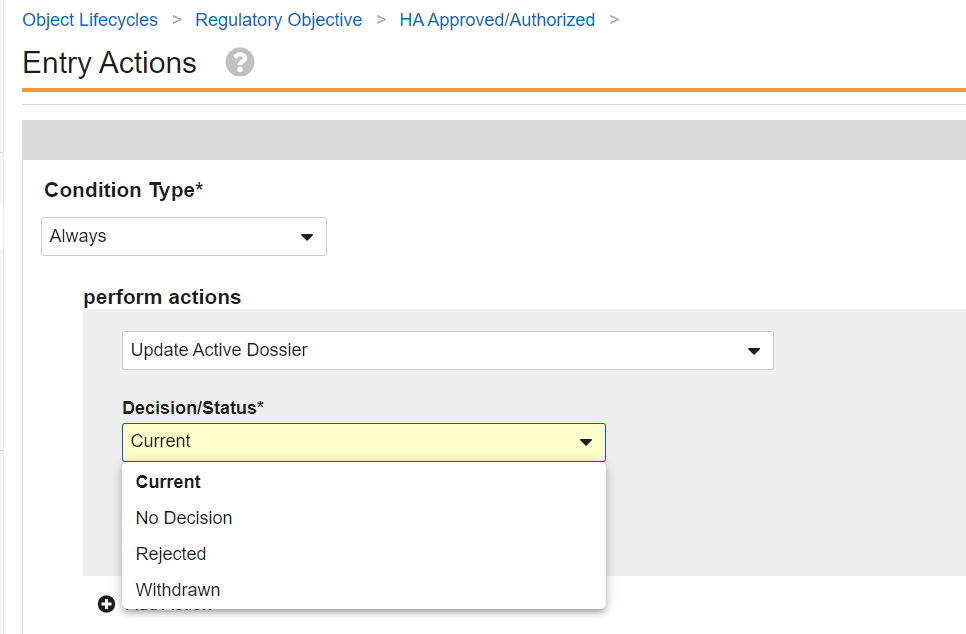
The Update Active Dossier entry action is configurable within a Regulatory Objective lifecycle state. Two configuration options are available when the Update Active Dossier system action is configured.

### Decision/Status

The Decision/Status picklist has the following options:

  * Current  
  * Rejected  
  * No Decision  
  * Withdrawn

When **Current** is configured on the entry action:

  * For each applicable Active Dossier Item Detail whose document is included in the submission's archive or relevant content plan, Vault sets the _Active Dossier Status_ to _Pending Current_.
  * Only Active Dossier Item Details that meet the following conditions are updated to _Pending Current_:  
    * _Active Dossier Status_ is Submitted.  
    * Metadata matches at least one of the related _Regulatory Objective's_ relationships. This means that it is expected for the _Regulatory Objective_ relationships (_Products_, _Active Substances_, _Inactive Ingredients_) to include the same relationships from the _Submission_ or _Event_ used to generate the Active Dossier records that are in-scope for the calculation, for example those where _Use For Content Planning is "Yes"_.  
    * eCTD operation from the related Archive node is not Delete.  
    * Submission field is populated with a Submission that is related to the Regulatory Objective
    * If Vault finds that there is already an Active Dossier Item Detail with a Current or Pending Current status that has a later version in the document version tree than the document included in the Submission's Archive or Content Plan, the status for the Active Dossier Item Detail record is updated to _Pending Superseded_ or _Replaced_, respectively, instead of changed to _Pending Current_. The status of the record for the later version in the document version tree is unchanged. 
    *  The _Approval Date_ is defaulted to the date set on the Regulatory Objective's _Actual Decision Date_ on the records updated to Pending Current.
  * Vault attempts to determine superseded document versions to set the _Active Dossier Status_ to _Pending Superseded_ or _Replaced_ for prior document version Active Dossier Item Detail records that meet the following conditions:  
    * Set with the relevant Application that the calculation occurs in  
    * _Active Dossier Status_ of Current or Pending Current
      * If the _Active Dossier Item Detail_ record has a status of _Pending Current_, Vault sets the status to _Replaced_ instead of updating it to _Pending Superseded_.
    * Set with metadata matches at least one of the related _Regulatory Objective's_ relationships.
    * Is seen as a previous document version either via version tree calculation or using the Originates From document relationship:  
      * **Version tree calculation:** Document with the same document ID and an earlier version within the document version tree than the version that is being set to _Pending Current_. For example, if a document with ID of 1234 and version of 5.0 is calculated as _Pending Current_, an _Active Dossier Item Detail_ with ID of 1234 and version of 3.0, _Active Dossier Status_ of _Current_, and that meets the above conditions is set to _Pending Superseded_.  
  * **Originates From document relationship**: Document that is a direct or indirect target of the _Originates From_ document relationship by the document that is being set to _Pending Current_. For example, document F is set in the _Originates From_ document relationship of document G, and document G is set in the _Originates From_ document relationship of document H. An Active Dossier Item Detail record for document H will be set to _Pending Current_. An existing Active Dossier Item Detail record for document F with a _Current_ status that meets the above conditions is set to _Pending Superseded_.
    * The _End Date_ is defaulted to the date set on the Regulatory Objective's _Actual Decision Date_ on the records updated to _Pending Superseded_.

When **Rejected** is configured on the entry action:
  *  Active Dossier Item Details for all Submissions associated with the Regulatory Objective where the entry action is initiated are moved to the Rejected Active Dossier Status.  
    * The *End Date* is defaulted to the date set on the Regulatory Objective's *Actual Decision Date* on the records updated to Rejected.

When **No Decision** is configured on the entry action:
  * Active Dossier Item Details for all Submissions associated with the Regulatory Objective are moved to the No Decision Active Dossier Status.

When **Withdrawn** is configured on the entry action:
  * Active Dossier Item Details for all Submissions associated with the Regulatory Objective where the entry action is initiated are moved to the Withdrawn Active Dossier Status
    * The End Date is defaulted to the date set on the Regulatory Objective's Actual Decision Date on the records updated to Withdrawn.

<div class="note-border alert-important">
  <div class="alert alert-important" role="alert">
    <div><i class="far fa-exclamation-circle"></i></div>
    <div class="alert-text">
      <p><strong>Important</strong>: Vault can only use active Regulatory Objective relationships during the calculation, including active Submission Regulatory Objectives. This means that if the parent Submission or Regulatory Objective is in a lifecycle state where records are inactive, the calculation will not run.</p>
    </div>
  </div>
</div>


### Approval Type

  When the Decision/Status is set to Current, the _Approval Type_ is available for configuration. The _Approval Type_ picklist has the following options:

  * Explicit Approval   
  * Implicit Approval   
  * Partial Approval

  The Approval Type configuration is only available if the Decision/Status is set to **Current**.

  * When **Explicit Approval** is configured, the _Approval Type_ field is set to **Explicit Approval** on the relevant records related to the Regulatory Objective.  
  * When **Implicit Approval** is configured, the _Approval Type_ field is set to **Implicit Approval** on the relevant records related to the Regulatory Objective.  
  * When **Partial Approval** is configured, the _Approval Type_ field is set to **Partial Approval** on the relevant records related to the Regulatory Objective.

### eCTD Submissions

  * For eCTD submissions with a _Leaf Operation_ of _Replace_, Vault locates the target document of the _Replace_ operation and sets the status of the _Active Dossier Item Detail_ record for that document as _Pending Superseded_ as long as the target document's _Active Dossier Item Detail_ record has a status of _Current_, the same _Submission Metadata_, and the same _Application_. If the target document's _Active Dossier Item Detail_ record has a status of _Pending Current_, Vault sets the status to _Replaced_.
  * For eCTD submissions with a _Leaf Operation_ of _Delete_, Vault locates the target document of the _Delete_ operation and sets the status of the _Active Dossier Item Detail_ record for that document as _Pending Deprecation_ as long as the target document's _Active Dossier Item Detail_ record has a status of _Current_, the same _Country_, and the same _Application_. If the target document's _Active Dossier Item Detail_ record has a status of _Pending Current_, Vault sets the status to _Replaced_.

### Configuring Regulatory Objective Lifecycle Update Active Dossier Entry Actions {#Configuring-Regulatory-Objective-Lifecycle-Update-Active-Dossier-Entry-Actions}

The _Update Active Dossier_ entry action automates the status change of _Active Dossier_ records to **Pending Current/Superseded/Deprecated**, **Rejected**, **Withdrawn**, or **No Decision**. The entry action can also be configured to set the _Approval Type_ when updating records to _Pending Current_. To configure this entry action:

1. Navigate to **Admin \> Configuration \> Object Lifecycles \> Regulatory Objective**.   
2. Configure an **Update Active Dossier** entry action on a Regulatory Objective lifecycle state and select the corresponding **Decision/Status**.  
3. If **No Decision**, **Rejected**, or **Withdrawn** is selected, then all valid *Active Dossier Item Detail* records related to the Regulatory Objective are moved into that configured status. If **Current** is selected, then the pending Current/Superseded/Deprecated calculation is run. For example, Vault moves valid *Active Dossier* records related to the Regulatory Objective to *Pending Current*, and previous superseded Active Dossier Item Details to *Pending Superseded*.  
4. If the **Decision/Status** is set to **Current**, then the **Approval Type** is displayed/available for configuration.  
5. Click **Save**.

<a href="https://platform.veevavault.help/assets/images/24r3-update-ad-entry-action.png" data-lightbox="images" data-title="" data-alt="Update Active Dossier Entry Actions">
  <img class="docimage" src="https://platform.veevavault.help/assets/images/24r3-update-ad-entry-action.png" alt="Update Active Dossier Entry Actions" style="max-width: 100%;width: 400px;"  />
</a>

## Configuring Active Dossier Workflows

### Configuring an Active Dossier Workflow for Submissions {#submission-workflow}

Vault includes a system action that generates _Active Dossier_ records automatically after the submission lifecycle state change is applied. Configure a new [object workflow](/en/lr/33550/) that includes this system action as follows:

  1. Navigate to **Admin > Configuration > Workflows** and click **Create**.
  2. Select the **Object Workflow** type in the _Create Workflow_ dialog and click **Continue**.
  3. Enter a **Label**. We recommend _Generate AD records from Submissions_.
  4. In the **Lifecycle** field, select **Submission Lifecycle**.
  5. Set the **Allow auto-start from entry action and event action** checkbox.
  6. Click **Save** to save the workflow and begin adding steps.
  7. Create a **Generate AD Records** step and select the **System Action** type.
  8. In the **System Action** field, select **Populate the Active Dossier**.
  9. Click **Save**.
  10. Activate the workflow.

#### Disabling Submissions Archive Path from Active Dossier Generation

You can use the **Disable Archive Population Path** setting on the **Populate Active Dossier** workflow system action to only search the Content Plan documents and metadata to create records. If you select the **Disable Archive Population Path** setting, Vault disregards the documents associated in the Source References relationship on the Submissions Archive documents when populating the Active Dossier.

If you are using Veeva Submissions Publishing, the published Archive document and related Archive node are set based on the Published Document on the Content Plan Item. If a Content Plan is not published with Veeva Submissions Publishing, then the Archive fields will not be set on the records created from the Content Plan.

#### Enabling Active Dossier Global Tracking 

You can use the **Enable Active Dossier Global Tracking** setting on the **Populate Active Dossier** workflow system action to update Active Dossier records created from Global Content Plan Dispatch from _Dispatched_ to _Submitted_ status when the same document version is submitted in a Submission Content Plan, without  
product or study metadata comparison. When **Enable Active Dossier Global Tracking** is de-selected, Active Dossier records created from dispatch are updated from _Dispatched_ to _Dispatched, Not Submitted_ when the same document version is submitted in a Submission Content Plan and its submission relationships do not match those of the dispatched record.

## Configuring Active Dossier Generation from a Global Content Plan Dispatch {#configuring-active-dossier-generation-from-global-content-plan-dispatch}

When Global Content Plan creation and dispatch are configured in your Vault, enable the _Populate Active Dossier_ action to generate [Active Dossier](/en/lr/71782/) records from a dispatch.

1. In the _Content Plan_ lifecycle, update the configured _Dispatch Global Content Plan_ user actions to use the _Populate Active Dossier_ configuration option. When following the [recommended configuration for Content Plan Dispatch](/en/lr/77855/#configuring-object-actions), these actions appear in the _Draft_ and _Baselined_ states.
2. In the _Event_ lifecycle, update the configured _Dispatch Global Content Plan_ user actions to use the _Populate Active Dossier_ configuration option. When following the [recommended configuration for generating Global Content Plans](/en/lr/77854/#configuring-the-event-lifecycle), these actions appear in the _Planned_, _In Progress_, _In Regulatory Assessment_, and _Regulatory Assessment Complete_ states.
3. Optional: Use the [_Active Dossier Loader_ object][11] to set the relevant _Event_, _Activity_, and _Needs Submission_ values in existing _Active Dossier Item Detail_ records.


<div class="note-border alert-info">
  <div class="alert alert-info" role="alert">
    <div><i class="far fa-info-circle"></i></div>
    <div class="alert-text">
      <p><strong>Note</strong>: For optimal feature performance, we recommend enabling Attachments on the <em>Submission</em> and <em>Event</em> objects, as well as enabling the <em>Enable Content Plan Comparison</em> <a href="/en/lr/53688/#enable-content-plan-comparison">Application Setting</a>. Otherwise, Active Dossier records may <a href="/en/lr/71782/#from-a-global-content-plan-dispatch">generate</a> inconsistently from the Global Content Plan dispatch.</p>
    </div>
  </div>
</div>


### About the Populate Active Dossier Action

During configuration, Vault lists disposition scenarios with defaulted _Local Disposition_ picklist values. Each disposition corresponds to the _Local Disposition_ value set on the target _Activity_, and Vault references the value when [creating Active Dossier records](/en/lr/71782/#from-a-global-content-plan-dispatch). Custom disposition picklist values can additionally be configured in the appropriate category. Active Dossier records will only be created for Activities with a Local Disposition that is configured in one of the disposition categories.

During Active Dossier population, Vault creates ADIDs only for Countries and Submission Countries that are not excluded from Active Dossier generation. If a Submission Country is marked as excluded, Vault skips ADID creation for that Submission and Country. 

While dispatch and Active Dossier generation logic allow you to relabel the default _Local Disposition_ values, we do not recommend rearranging the defaulted values for each scenario.

## Configuring Active Dossier Registration & Product Information Tracking {#configuring-active-dossier-registration-and-product-information-tracking}

[Registration tracking](/en/lr/71782/#registration-and-product-information-tracking) provides Registrations customers with a more granular view of the Active Dossier based on the _Registration_ and select product information details.. With the below configuration and data setup, Vault automatically creates _Active Dossier Item Detail_ relationship records for _Registrations, Product Variants_, _Manufacturers_, and _Inactive Ingredients_ based on matching fields between related _Registrations_, _Active Dossier Item Details_, and document metadata. These relationships are surfaced in the Active Dossier Viewer and are editable in the Active Dossier Editor.

To configure and set up data for registration and product information tracking:

1. Update the _Active Dossier Item Detail_ object page layout to include related object sections for the following objects:
    * _AD Item Detail Inactive Ingredient_
    * _AD Item Detail Manufacturer_
    * _AD Item Detail Product Variant_
    * _AD Item Detail Registration_
2. Update the _Active Dossier Template_ object page layout to include the _Registered Product Information Scope_ field. You'll populate this value on records later in the configuration process.
3. Optional: Update the _Controlled Vocabulary_ object page layout to include the _Exclude from Active Dossier_ field. You'll populate this value on records later in the configuration process.
4. Optional: Update the _Country_ object page layout to include the _Exclude from Active Dossier Generation_ and _Match on Procedure Type Countries_ fields. You'll populate these values on records later in the configuration process.
5. Recommended: Activate the _Missing Registration Data_ value in the _Active Dossier Update Reason_ picklist. Depending on your organization's requirements, you may also consider creating additional picklist values.
6. Review your Vault's object lifecycle configuration for the objects listed below. In order to create a corresponding _Active Dossier Item Detail_ relationship record, this feature requires that all listed objects have a lifecycle, and that the lifecycles' state types are mapped to a lifecycle state. To support this, you can create your own state type, or add this feature's included _Pending Approval_ and _Planned_ state types. Note: When configuring or reviewing state types, ensure the same types are used across all lifecycles. For example, if you updated the _Registration_ lifecycle to use the _Planned_ state type for this feature, the remaining lifecycles must also use the _Planned_ state type. Otherwise, you will not be able to select the state type later in the configuration process.
    * _Registration_
    * _Registered Product_
    * _Registered Active Substance_ (`registered_active_ingredient__v`)
    * _Registered Inactive Ingredient_
7. Review your Vault's _Active Dossier Template_ records. For each relevant record, ensure the _Registered Product Information Scope_ field is set appropriately for each template section. You can expedite this process using a Veeva-recommended <a class="download-link " href="https://platform.veevavault.help/assets/downloads/update-ad-templates-registered-product-information-scope-25r1.csv" target="_blank" rel="noopener">Vault Loader file<i class="fa fa-download" aria-hidden="true"></i></a>.
8. Review your Vault's _Controlled Vocabulary_ records for manufacturing site roles (where _Controlled Vocabulary Type_ is "Manufacturing Site Role"). For each site role Vault should ignore during Active Dossier record creation, set the _Exclude from Active Dossier_ field to "Yes".
9. Review your Vault's _Constraint_ and _Country_ records. For each [Procedure Type Country _Constraint_](/en/lr/43081/#dynamic-procedure-countries) mapping a country to the relevant Procedure Type, set the related _Country_ record's _Match on Procedure Type Countries_ field.. This step may require creating additional Procedure Type Country _Constraint_ records. If applicable according to your organization's requirements, also set the _Exclude from Active Dossier Generation_ field on the relevant _Country_ records. See [additional details][21] below.
10. Review your Vault's security configuration for Registrations functionality. To use the Active Dossier for registration and product information tracking, users must be assigned a permission set with [permissions for the Active Dossier generally][16], in addition to [feature-specific objects and fields][22].
11. Enable the _Active Dossier Registration Tracking_ [application setting](/en/lr/53688/#active-dossier-registration-tracking), then select the setting's _Valid Registration State Types_ you configured or confirmed in Step 6. If you do not see the expected state types, confirm the same state types are used across all impacted lifecycles.

### Updating Country Records {#updating-country-records}

Vault uses _Country_ , _Application Country_, and _Submission Country_ records and their _Exclude from Active Dossier Generation_ and _Match on Procedure Type Countries_ field values to determine which Active Dossier records to create for registration tracking.

The Country and Submission Country value for _Exclude from Active Dossier Generation_ determines whether the _Active Dossier Item Detail_ records are created during automated generation. 

If configured, Application Country values can default to Submission Country. 

As the values you select within _Country_ records depend on your organization's processes, consider the below guidelines.

* If your organization's processes use a single European Union country on an application and submission for centralised procedures, consider setting _Match on Procedure Type Countries_ to "Yes" on the European Union _Country_ record. This also requires creating [Procedure Type Country _Constraint_](/en/lr/43081/#dynamic-procedure-countries) records accordingly for the centralised procedure type.
* If your organization tracks the granular EU countries on an application and submission, consider:  
  * Including both European Union and individual EU countries.   
  * Setting _Exclude from Active Dossier Generation_ = Yes for individual EU countries  
  * Keeping EU included
This ensures Active Dossier records are generated only for EU. If a national submission is required for a specific country, for example for France, the _Exclude from Active Dossier Generation_ can be updated to No or blank for the submission, so that Active Dossier records are created for the Submission and Country within the centralised procedure. 
* For additional _Country_ records for which it does not make sense to track within the Active Dossier (such as Common (EU) or Common (GCC)), consider setting the _Exclude from Active Dossier Generation_ on these records to "Yes". This prevents Vault from creating Active Dossier records for these countries when populating the Active Dossier.

### About the Display Multiple Field {#display-multiple}

This feature includes the _Display Multiple_ field, which allows Vault to indicate to Active Dossier Viewer users that a single _Active Dossier Item Detail_ record is associated with a _Registration, Product Variant_, _Manufacturer_, and/or _Inactive Ingredient_ when hovering over the viewer's **Multiple** icon.

To do this, Vault runs the [_Active Dossier Display Update_ SDK job](/en/lr/44922/#regulatory-jobs) to set the field accordingly when any such relationship records are created or deleted. As a result, viewer users may experience a delay in viewing the **Multiple** icon if they are attempting to do so before the update job completes its run.

This system-managed picklist field does not require configuration on any object page layouts.

## Working with Active Dossier Templates {#working-with-active-dossier-templates}

You can configure _Active Dossier Template_ records and customize standard Active Dossier Templates specific to your organization's needs. The sections below provide the recommended configuration for managing the existing records in your Vault.

### Updating Active Dossier Templates

<div class="note-border alert-info">
  <div class="alert alert-info" role="alert">
    <div><i class="far fa-info-circle"></i></div>
    <div class="alert-text">
      <p><strong>Note</strong>: For Veeva to properly maintain Active Dossier records, you cannot delete standard <em>Active Dossier Template</em> records, nor update a standard record’s <em>RIM UUID</em> Reference Model fields.</p>
    </div>
  </div>
</div>


The _Active Dossier Template_ object includes the _Document Type_ and _Reference Model_ fields. Vault uses these fields to determine which documents to add to the Active Dossier.

By default, Vault references the value in the _Document Type_ field to determine the document types to include in the Active Dossier structure. You can populate the _Document Type_ field by navigating to **Business Admin > Active Dossier Template** and assigning a _Document Type_ to each record.

If the _Document Type_ field is blank, Vault instead references the value in the _Reference Model_ field when creating the _Active Dossier Structure_. The _Active Dossier Template_ records provisioned by Veeva include values in the _Reference Model_ field by default, but you must configure the RIM Reference Model in order for Vault to use it when creating the Active Dossier. Standard Active Dossier Templates are managed by Veeva and have a Vault RIM UUID set. The _RIM Reference Model_ field on standard templates is non-editable.

It is recommended to set the _Document Type_ in the RIM Reference Model.  You can choose to only set the document type on the _Active Dossier Template_ field, which does not override anything mapped in the RIM Reference Model.

See [How Active Dossier Uses the RIM Reference Model](/en/lr/71558/#how-active-dossier-uses-the-rim-reference-model) for more information.

### Customizing Standard Active Dossier Templates

You can customize the following on standard _Active Dossier Templates_ to align with your organizational terminology and specific business requirements.

* The _Displayed Section Name_ (`display_name__v`) field cannot be updated for standard Active Dossier Templates that contain tokens.  
* Reorder _Active Dossier Template_ records within a single level in the hierarchy.  
* Incorporate new template records to track additional documents specific to your organization's needs.

Updates made to templates are automatically synced to the Active Dossier records. There may be a delay between when the template change is made and when the change is reflected in the Active Dossier records and viewer, and therefore the sync may not be immediate.

### Creating Custom Active Dossier Templates

You can create new templates within standard hierarchies, or create new template hierarchies to accommodate diverse product types or business needs.

#### Limitations

The following limits apply to the configuration of Active Dossier Templates:

* No more than 500 custom nodes per hierarchy.  
* No more than 20 levels deep.  
* Only one user can edit Active Dossier Templates within an Active Dossier Hierarchy at a time.   
* Active Dossier Templates must be created level by level if they are created in bulk, for example with Vault Loader.  
  * Only Active Dossier Templates in the same template hierarchy can be loaded in the same batch.   
* Reparenting Active Dossier Templates under a different template hierarchy is not supported.  
* Updating display names of standard templates with tokens and creating custom Active Dossier Template records with tokens in the display name are not supported.

### Reordering

You can reorder _Active Dossier Template_ records by selecting a reposition action from the _Actions_ menu for the record you want to move.

To reorder _Active Dossier Template_ records using the _Actions_ menu:

1. Navigate to the Root or relevant _Active Dossier Template_. Click the **View Tree Layout** button to navigate to the template viewer. Ensure that **Display Children** and **All Objects** are selected.  
2. Open the grid item **Actions** menu for the record you want to move.  
3. Select an action under **Reposition**, for example **Move to Bottom** to reposition as the last item in the list. If you select **Set Exact Position**, the **Set Position of Record Within List** dialog opens. Enter a position for your record. The position is a number representing the place in the order of all records in the list. For example, entering _3_ places the record third in the list.  
4. Click **OK**. Vault reorders the object records.

### Reparenting

You can reparent custom *Active Dossier Template* records. You can only reparent within the same Active Dossier Template. 

### Configuring Multiple Hierarchies

When there are multiple Active Dossier hierarchies, the Active Dossier Viewer's global filters include a hierarchy selector.

You must enable and configure permissions on the _Root Template_ and _Active Dossier Template_ fields specified and disable uniqueness on the Active Dossier Template's _Document Type_ field. 

To use the Active Dossier Templates and multiple Active Dossier hierarchies:

1. Configure the Active Dossier Template tab to allow users to create records.   
2. Activate the _Active Dossier Template_ field on the _Application Object_ and add to relevant page layouts, for example Content Plan and Publishing layouts. You must have permissions for the _Active Dossier Template_ field and Active Dossier Template, or the viewer will fail to load.  
3. Activate the inactive Active Dossier templates you want to use, or create your own.  
4. Enrich your existing _Application_ records to reference the relevant Active Dossier Template. If this field is blank, the existing CTD template currently in use is defaulted.

<a href="https://platform.veevavault.help/assets/images/25r1.3-regulatory-18.png" data-lightbox="images" data-title="" data-alt="Update Active Dossier Entry Actions">
  <img class="docimage" src="https://platform.veevavault.help/assets/images/25r1.3-regulatory-18.png" alt="Update Active Dossier Entry Actions" style="max-width: 100%;width: 400px;"  />
</a>

We recommend updating the *Name* on existing _Active Dossier Template_ records to match the _Display Name_ for easier readability of the _Root_ record when the multiple hierarchy selector is displayed in the Viewer. This includes renaming the existing _Root_ record for CTD with the _Vault RIM UUID_ of f2d76f48-91bc-4a31-b254-3cdaaa81fc14 so that the hierarchy selector displays that Root name instead of the current auto-numbered string, for example "ADT-000089".

## Loading Active Dossier Records {#loading-active-dossier-records}

If your organization is adopting Active Dossier to replace an existing custom solution or an external system for tracking submitted documents in Vault, you can use the _Active Dossier Loader_ object to generate the necessary records. We recommend leveraging [Vault Loader](/en/lr/26607/) to create _Active Dossier Loader_ records in bulk.

Once you've [migrated source documents](/en/lr/26605/) into your Vault Library, prepare a CSV input file containing the required and optional object fields to load to the _Active Dossier Loader_ object.

When you load data to the _Active Dossier Loader_ object, Vault uses it as an intermediate staging object to assess the standing of _Active Dossier Item_, _Active Dossier Item Detail_, and _Active Dossier Structure_ object records in your Vault. Following the assessment, Vault creates or updates these records according to the input file.

The CSV output file Vault sends once the load is complete does not include the _Active Dossier Item_, _Active Dossier Item Detail_, and _Active Dossier Structure_ records it created based on the Active Dossier Loader object data. You can confirm these records directly in your Vault, or extract the data from each object using Vault Loader.

The sections below outline the _Active Dossier Loader_ [required][12] and [optional][14] object fields to include in your CSV input file, as well as the target objects and fields Vault creates, populates, and updates during the loading process.

### Required Fields {#required-fields}

The table below describes the fields required to load to the _Active Dossier Loader_ object.


<div class="note-border alert-info">
  <div class="alert alert-info" role="alert">
    <div><i class="far fa-info-circle"></i></div>
    <div class="alert-text">
      <p><strong>Note</strong>: To prevent invalid metadata combinations, only one of the fields marked with an asterisk (*) can be populated. For example, the <em>Active Substance</em> field should remain blank when the <em>Product</em> field is populated.</p>
    </div>
  </div>
</div>


|Active Dossier Loader Field|Target Object(s)|Target Field(s)|
|--- |--- |--- |--- |
|Source Document (`document__v`)|Active Dossier Item, Active Dossier Item Detail|**ADI**: Document, Document Number, Document Title, Document Version ID <br>**ADID**: Document, Document ID, Document Major Version, Document Minor Version|
|Country (`country__v`)|Active Dossier Item Detail|Relevant country field|
|Active Substance* (`active_substance__v`)|Active Dossier Item|Active Substance|
|Product* (`product__v`)|Active Dossier Item|Product <br> **Note**: If the _Inactive Ingredient_ field is populated, _Product_ must also be populated.|
|Product Family* (`product_family__v`)|Active Dossier Item, Active Dossier Item Detail|**ADI**: Product Family <br>**ADID**: Product Family <br> **Note**: If an existing record is already found, specific fields are set based on the values provided.|
|Root Template (`root_template__v`)|Active Dossier Template|Root Template <br>If the _Template_ field is blank, the _Root Template_ field is required and determines which hierarchy to create the Active Dossier records for. If the _Root Template_ field is blank, it defaults to the existing Marketing CTD hierarchy.|
|Clinical Study (`clinical_study__v`)|Active Dossier Item|Note: If _Indication_ is also set, then the _Clinical Study_ section is created under the respective _Indication_ section. <br> Note: _Study Type_ and _Study Subtype_ are used to determine which repeating section to generate Active Dossier records under |
|Nonclinical Study (`clinical_study__v`)|Active Dossier Item|Nonclinical _Study Type_ and Nonclinical _Study Subtype_ are used to determine which repeating section to generate Active Dossier records under |

#### About XML Fields {#about-xml-fields}

The following fields are used to locate the correct Submissions Archive node and are required when there is more than one valid node for the _Application_ and _Submission_, for example when a document is used in multiple sections within the same _Submission_:
  * _XML Product_ (`xml_product__v`)
  * _XML Manufacturer_ (`xml_manufacturer__v`)
  * _XML Product Dosage Form_ (`xml_product_dosage_form__v`)
  * _XML Drug Substance_ (`xml_drug_substance__v`)
  * _XML Excipient_ (`xml_excipient__v`)
  * _XML Clinical Study ID_ (`xml_clinical_study_id__v`)
  * _XML Indication_ (`xml_indication__v`)
  * _XML Nonclinical Study ID_ (`xml_nonclinical_study_id__v`)

### Optional Fields {#optional-fields}

The table below describes fields that are optional to include in the loader file.

| _Active Dossier Loader_ Field       | Target Object(s)       | Target Field(s)       | Additional Considerations       |
|---|---|---|---|
| Active Dossier Status (`active_dossier_status__v`)       | Active Dossier Item, Active Dossier Item Detail       | Active Dossier Status       |      |
| Active Substance Manufacturer (`active_substance_manufacturer__v`)       | Active Dossier Item       | Active Substance Manufacturer        | When populated, _Active Substance_ must also be populated.       |
| Activity (`activity__v`) | Active Dossier Item Detail | Activity | When enabling Active Dossier generation from a Global Content Plan, use this field to set a related Activity. |
| ADID External ID (`adid_external_id__v`) | Active Dossier Item Detail | ADID External ID |  |
| Application (`application__v`)       | Active Dossier Item Detail       | Application       |      |
| Approval Date (`approval_date__v`)       | Active Dossier Item Detail   | Approval Date       | This date is automatically populated or updated with the Regulatory Objective record's _Actual Decision Date_ when an ADID record is moved to a "Pending Current" status, or if an existing (Pending Current, Current) Active Dossier Item Detail is found during Regulatory Objective calculation.     |
| Approval Type (`approval_type__v`)       | Active Dossier Item Detail   | Approval Type       |    |
| Comments (`comments__v`)       | Active Dossier Item Detail   | Comments       | Free-text field that allows you to add notes or additional context about the record.   |
| Dispatch Date (`dispatch_date__v`)       | Active Dossier Item Detail   | Dispatch Date       | This date is automatically recorded when an Active Dossier Item Detail (ADID) is initially created from a GCP dispatch. You may inactivate this field if your organization does not use Global Content Plans.   |
| End Date (`end_date__v`)       | Active Dossier Item Detail   | End Date       | This date is automatically set with the superseding Regulatory Objective's _Actual Decision Date_ when an Active Dossier Item Detail is calculated as _Pending Superseded_ or _Pending Deprecated_. It is automatically set if an Active Dossier Item Detail is moved to _Rejected_ or _Withdrawn_ via a _Regulatory Objective_ state change.   |
| Event (`event__v`) | Active Dossier Item Detail | Event | When enabling Active Dossier generation from a Global Content Plan, use this field to set a related Event. |
| Inactive Ingredient (`inactive_ingredient__v`)       | Active Dossier Item       | Inactive Ingredient       | When populated, the _Product_ field must also be populated. See also Required Fields.       |
| Inactive Ingredient Manufacturer (`inactive_ingredient_manufacturer__v`)       | Active Dossier Item       | Inactive Ingredient Manufacturer        | When populated, _Inactive Ingredient_ must also be populated.       |
|Indication (`indication__v`)|Active Dossier Item|Indication|
| Latest for Authoring (`latest_for_authoring__v`)       | Active Dossier Item Detail      | Latest for Authoring        | When this is left blank or not included, Vault will automatically set this value. This may also impact the [Active Dossier](/en/lr/71782/) records from a [Latest for Authoring](/en/lr/71782/#how-vault-sets-latest-for-authoring) value on Active Dossier Item Details for earlier versions of this document version.      |
| Latest for Authoring End Date (`latest_for_authoring_end_date__v`)       | Active Dossier Item Detail      | Latest for Authoring End Date        |      |
| Needs Submission (`needs_submission__v`) | Active Dossier Item Detail | Needs Submission | When enabling Active Dossier generation from a Global Content Plan, the "Yes" picklist value denotes records with dispositions requiring submission before implementation. |
| Product Manufacturer (`product_manufacturer__v`)       | Active Dossier Item       | Product Manufacturer        | When populated, _Product_ must also be populated.       |
| Product Variant (`product_variant__v`)       | Active Dossier Item       | Product Variant        | When populated, _Product_ must also be populated.       |
| Published Report Document (`published_report_document__v`)       | Active Dossier Item Detail      | Published Report Document        | If the in-scope document as _Published by RLCP_ set to _Yes_, then this document version is set within the _Published Report Document_ field on the Active Dossier Item Detail and the source documents found in the Source References relationship are used for Active Dossier record creation.       |
| Regulatory Objective (`regulatory_objective__v`)       | Active Dossier Item Detail       | Regulatory Objective        |      |
| Submission (`submission__v`)       | Active Dossier Item Detail       | Submission       |      |
| Submissions Archive Document (`archive_document__v`)       | Active Dossier Item Detail       |      Submission Metadata, Submissions Archive Document, Is eCTD      |  When populated, _Application_ and _Submission_ must also be populated. In some cases, XML fields must also be populated in order to locate the correct Submission Archive node. See [About XML Fields][13].       |
| Submitted Date (`Submitted_Date__v`)       | Active Dossier Item Detail       | Submitted Date        | This lookup field shows the _Actual Submission Date_ value of the related Submission record.       |
| Template (`template__v`)       | Active Dossier Item Detail       | Template, Section        | When blank, the source document's Document Type determines which template section in which to add records. <br>In this case, the Root Template must also be specified if you are intending to populate Active Dossier for any hierarchy that is not the default Common Technical Document (CTD) - Marketing hierarchy (Vault RIM UUID of f2d76f48-91bc-4a31-b254-3cdaaa81fc14). <br>Otherwise, the _Template_ field is required if the document type is not mapped in the Active Dossier Template or RIM Reference Model.       |
| Translation Document (`translation_document__v`)       | Active Dossier Item Detail       | Translation Document       |      |

## Related Permissions for General Active Dossier Use {#related-permissions}
The sections below describe the minimum object permissions required for users to work within both the Active Dossier Viewer and Editor. All permissions are located in **Admin > Users & Groups > Permission Sets**. 

### Objects & Tabs

The permissions described below are located in the **Objects** or **Tabs** permission set tabs. For objects, you can also set these by clicking on the object and making selections under the **Object Permissions** heading.


<div class="note-border alert-info">
  <div class="alert alert-info" role="alert">
    <div><i class="far fa-info-circle"></i></div>
    <div class="alert-text">
      <p><strong>Note</strong>: If Dynamic Access Control is enabled in your Vault for any of the below objects, a corresponding matching or custom sharing rule must be in place to ensure users can view and work with records.</p>
    </div>
  </div>
</div>


| Object or Tab | Permission | Controls |
|---|---|---|
| Active Dossier Item,<br>Active Dossier Item Detail,<br>Active Dossier Structure | Read, Create, Edit | **Read**: View Active Dossier records in the Viewer.<br>**Create, Edit**: Ability to access the Add to Active Dossier dialog from the Editor and create Active Dossier records.<br>Note: Create and Edit functions are also controlled by field permissions. See [Object Fields][17] below. |
| Application | Read | Ability to open the Editor from a _Regulatory Objective_, _Submission_, or _Event_ record. |
| Active Dossier Processing Issue (`active_dossier_processing_issue__v`) | Read, Edit  | Read: View Active Dossier Processing Issue records. Edit: Ability to edit Active Dossier Processing Issue records and mark them as *Acknowledged*.   |
| Active Dossier Processing (`active_dossier_processing__v`) | Read | **Read**: View Active Dossier Processing records and view the hovercard within AD Viewer and on Event, Submission, and Regulatory Objective records to view the five most recent Active Dossier Processes.  |
| Active Dossier Processing Validation  (`active_dossier_processing_validation__v`) | Read, Edit  | **Read**: View Active Dossier Processing Validation records. **Edit**: Ability to edit Active Dossier Processing Validation records in order to set them as Active or Inactive.  |
| Active Dossier Template (`active_dossier_template__v`) | Read | **Read**: View Active Dossier records in the Viewer as well as utilize the Editor when there are multiple Active Dossier hierarchies in the Vault. <br>Read access on the _Root Template_ field is also required for proper access when there are multiple Active Dossier hierarchies. |
| Active Substance (`drug_substance__v`) | Read | Ability to open the drag and drop dialog from the Editor. |
| Activity | Read | Ability to open the Editor from an _Event_ record. |
| Application | Read | Ability to open the Editor from a *Regulatory Objective*, *Submission*, or *Event* record. <br>Read access to the _Active Dossier Template_ field is required to properly load the Viewer and Editor when there are multiple Active Dossier hierarchies in the Vault.|
| Country | Read | Ability to filter and view Active Dossier records by Regulatory Objective in the Viewer and open the drag and drop dialog from the Editor. |
| Country Decision Detail | Read | Ability to view Active Dossier records in the Viewer and Editor. |
| Event | Read | Ability to open the Editor from an _Event_ record. |
| Inactive Ingredient (`excipient__v`) | Read | Ability to open the drag and drop dialog from the Editor. |
| Manufacturer | Read | Ability to open the drag and drop dialog from the Editor. |
| Product (`drug_product__v`) | Read | Ability to open the drag and drop dialog from the Editor. |
| Product Family (`product__v`) | Read | Ability to view Active Dossier records in the Viewer and open the drag and drop dialog from the Editor. |
| Product Family Application | Read | Ability to filter and view Active Dossier records by Product Family then by Application in the Viewer and Editor. |
| Regulatory Objective | Read, Edit | Ability to open the Editor from a _Regulatory Objective_, _Submission_, or _Event_ record. |
| Submission | Read, Edit | Ability to open the Editor from a _Regulatory Objective_, _Submission_, or _Event_ record. |
| Submission Country | Read | Ability to filter and view Active Dossier records by Submission in the Viewer and Editor. |
| Tabs: Active Dossier | View | Ability to access the Viewer from the tab. |

### Object Fields {#object-fields}

The _Active Dossier Item_ and _Active Dossier Item Detail_ object fields listed below are minimally required to access and perform tasks within the Viewer and Editor.

The permissions described are located in the permission set tab **Objects > [Object] > Object Field Permissions**.


<div class="note-border alert-info">
  <div class="alert alert-info" role="alert">
    <div><i class="far fa-info-circle"></i></div>
    <div class="alert-text">
      <p><strong>Note</strong>: Fields marked with an asterisk (*) are collectively the minimally-required fields to which users must have Edit access in order to create Active Dossier records in the Editor. If a user is missing Edit permission to any of them, the drag-and-drop action fails.</p>
    </div>
  </div>
</div>


| Field | Permission | Controls |
|---|---|---|
| Active Dossier Item (_Active Dossier Item Detail_ object only) | Read | View Active Dossier records in the Viewer. |
| Active Dossier Item | Read | View and filter by field |
| Active Dossier Item Detail | Read | View and filter by field |
| Active Dossier Status* (_Active Dossier Item Detail_ object only) | Read, Edit | **Read**: View Active Dossier records in the Viewer.<br>**Edit**: The ability to Add to Active Dossier in the Editor. |
| Active Substance* | Read, Edit | **Read**: View and filter by field in the Viewer.<br>**Edit**: The ability to Add to Active Dossier in the Editor. |
| Active Substance Manufacturer* | Read, Edit | **Read**: View and filter by field in the Viewer.<br>**Edit**: The ability to Add to Active Dossier in the Editor. |
| Activity | Read, Edit | **Read**: View and filter by field, as well as view the field in the hovercard in the Viewer.<br>**Edit**: The ability to Add to Active Dossier in the Editor. |
| Application* | Read, Edit | **Read**: View and filter by column, as well as view the field in the hovercard in the Viewer.<br>**Edit**: The ability to Add to Active Dossier in the Editor. |
| Clinical Study | Read, Edit | **Read**: View and filter by field in the Viewer.<br>**Edit**: The ability to Add to Active Dossier in the Editor. |
| Country (_Active Dossier Item Detail_ object only) | Read | View Active Dossier records in the Viewer. |
| Country Code (_Active Dossier Item Detail_ object only) | Read | View Active Dossier records in the Viewer. |
| Created By | Read | View and filter by field |
| Created Date | Read | View and filter by field |
| Document | Read | **Read**: View and filter by field, as well as view document details in the hovercard in the Viewer.|
| Event | Read, Edit | **Read**: View and filter by field, as well as view the field in the hovercard in the Viewer.<br>**Edit**: The ability to Add to Active Dossier in the Editor. |
| Hierarchy Path (_Active Dossier Item_, _Active Dossier Item Detail_, _Active Dossier Structure_ objects) | Read | View _Active Dossier_ records in the Viewer. |
| Inactive Ingredient* | Read, Edit | **Read**: View and filter by field in the Viewer.<br>**Edit**: The ability to Add to Active Dossier in the Editor. |
| Inactive Ingredient Manufacturer* | Read, Edit | **Read**: View and filter by field in the Viewer.<br>**Edit**: The ability to Add to Active Dossier in the Editor. |
| Indication | Read, Edit | **Read**: View and filter by field in the Viewer.<br>**Edit**: The ability to Add to Active Dossier in the Editor. |
| Latest Change Comments | Edit | Enter optional comments when performing an edit or delete in the Active Dossier Editor |
| Metadata Search String (_Active Dossier Item_ and _Active Dossier Item Detail_ objects) | Read | View Active Dossier records in the Viewer. |
| Modified By | Read | View and filter by field |
| Modified Date | Read | View and filter by field |
| Nonclinical Study | Read, Edit | **Read**: View and filter by field in the Viewer.<br>**Edit**: The ability to Add to Active Dossier in the Editor. |
| Product* | Read, Edit | **Read**: View and filter by field in the Viewer.<br>**Edit**: The ability to Add to Active Dossier in the Editor. |
| Product Family* | Read, Edit | **Read**: Ability to load the Viewer or Editor.<br>**Edit**: The ability to Add to Active Dossier in the Editor. |
| Product Manufacturer* | Read, Edit | **Read**: View and filter by field in the Viewer.<br>**Edit**: The ability to Add to Active Dossier in the Editor. |
| Product Variant* | Read, Edit | **Read**: View and filter by field in the Viewer.<br>**Edit**: The ability to Add to Active Dossier in the Editor. |
| Region | Read | Ability to load the Viewer or Editor. |
| Reason for Change | Edit | Enter the required reason when performing an Edit, Move, or Delete action in the Active Dossier Editor. Not required for Confirm Pending or when editing the Comment field only |
| Regulatory Objective* | Read, Edit | **Read**: View and filter by field, as well as view the field in the hovercard in the Viewer.<br>**Edit**: The ability to Add to Active Dossier in the Editor. |
| Submission* | Read, Edit | **Read**: View and filter by field, as well as view the field in the hovercard in the Viewer.<br>**Edit**: The ability to Add to Active Dossier in the Editor.|
| Submissions Archive Document | Read | View document details in the hovercard in the Viewer. Users must also have corresponding permissions to view the document. |
| Translation Document | Read | View document details in the hovercard in the Viewer. Users must also have corresponding permissions to view the document. |
| Any applicable country field,<br>for example _Afghanistan (AF)_* | Read, Edit | **Read**: View and filter by country in the Viewer.<br>**Edit**: The ability to Add to Active Dossier in the Editor. |

### Object Actions

The permissions described below are located in the permission set tab **Objects > [Object] > Object Action Permissions**.

| Object | Action | Permission | Controls |
|---|---|---|---|
| Event | View Active Dossier | View, Execute | Ability to open the Viewer, filtered by the event or event's relationships. |
| Event  | Edit Active Dossier | View, Execute | Ability to open the Editor, filtered by the event or event's relationships. |
| Submission | View Active Dossier | View, Execute | Ability to open the Viewer, filtered by the submission or submission's relationships. |
| Submission  | Edit Active Dossier | View, Execute | Ability to open the Editor, filtered by the submission or submission's relationships. |
| Regulatory Objective | View Active Dossier | View, Execute | Ability to open the Viewer, filtered by the regulatory objective or regulatory objective's relationships. |
| Regulatory Objective | Edit Active Dossier | View, Execute | Ability to open the Editor, filtered by the regulatory objective or regulatory objective's relationships. |

## Related Permissions for Registrations & Product Information Tracking {#related-permissions-regs-tracking}

In addition to the [permissions for general Active Dossier use][16], Registrations users should also be granted the below permissions in order to work with [registration and product information tracking][20] in the Active Dossier Viewer and Editor.

All permissions are located in **Admin > Users & Groups > Permission Sets**.

### Objects

The permissions described below are located in the **Objects** permission set tab. You can also set these by clicking on the object and making selections under the **Object Permissions** heading.


<div class="note-border alert-info">
  <div class="alert alert-info" role="alert">
    <div><i class="far fa-info-circle"></i></div>
    <div class="alert-text">
      <p><strong>Note</strong>: If Dynamic Access Control is enabled in your Vault for any of the below objects, a corresponding matching or custom sharing rule must be in place to ensure users can view and work with records.</p>
    </div>
  </div>
</div>


| Object | Permission | Controls |
|---|---|---|
| AD Item Detail Registration | Read, Create, Delete | **Read**: Filtering by _Registration_ in the Viewer and Editor, view access to the _Registration_ column in the _Active Dossier Item Detail_ page layout.<br>**Create**: Create object records of this type.<br>**Delete**: Delete object records of this type.<br>**Create or Delete**: Inline and bulk editing in the Editor. |
| AD Item Detail Product Variant | Read, Create, Delete | **Read**: View access to the _Product Variant_ column in the _Active Dossier Item Detail_ page layout.<br>**Create**: Create object records of this type.<br>**Delete**: Delete object records of this type.<br>**Create or Delete**: Inline and bulk editing in the Editor. |
| AD Item Detail Manufacturer | Read, Create, Delete | **Read**: View access to the _Manufacturer_ column in the _Active Dossier Item Detail_ page layout.<br>**Create**: Create object records of this type.<br>**Delete**: Delete object records of this type.<br>**Create or Delete**: Inline and bulk editing in the Editor. |
| AD Item Detail Inactive Ingredient | Read, Create, Delete | **Read**: View access to the _Inactive Ingredient_ column in the _Active Dossier Item Detail_ page layout.<br>**Create**: Create object records of this type.<br>**Delete**: Delete object records of this type.<br>**Create or Delete**: Inline and bulk editing in the Editor. |
| Registration: At least one object type | Read | Filtering by Registration in the Viewer and Editor, view access to the _Registration_ column in the _Active Dossier Item Detail_ page layout. |
| Product Variant (`product_detail__v`): At least one object type | Read | View access to the _Product Variant_ column in the _Active Dossier Item Detail_ page layout. |
| Manufacturer: At least one object type | Read | View access to the _Manufacturer_ column in the Active Dossier Item Detail page layout. |
| Inactive Ingredient (`excipient__v`): At least one object type | Read | View access to the _Inactive Ingredient_ column in the _Active Dossier Item Detail_ page layout. |

### Object Fields

The below _Active Dossier Item Detail_ relationship object field permissions are required for product and information tracking, and are located in the permission set tab **Objects > [Object] > Object Field Permissions**.

| Object | Field | Permission | Controls |
|---|---|---|---|
| AD Item Detail Registration | Registration | Read | Filtering by _Registration_ in the Viewer and Editor, view access to the _Registration_ column in the _Active Dossier Item Detail_ page layout. |
| AD Item Detail Product Variant | Product Variant | Read | View access to the _Product Variant_ column in the _Active Dossier Item Detail_ page layout. |
| AD Item Detail Manufacturer | Manufacturer | Read | View access to the _Manufacturer_ column in the _Active Dossier Item Detail_ page layout. |
| AD Item Detail Inactive Ingredient | Inactive Ingredient | Read | View access to the _Inactive Ingredient_ column in the _Active Dossier Item Detail_ page layout. |

 [1]: #working-with-active-dossier-templates
 [2]: #consolidating-active-dossier-sections
 [6]: #configure-actions
 [7]: #submission-workflow
 [9]: #reg-objective-workflow
 [10]: #clear-ad-status-workflow
 [11]: #loading-active-dossier-records
 [12]: #required-fields
 [13]: #about-xml-fields
 [14]: #optional-fields
 [15]: #configuring-the-active-dossier-update-country-on-adi-workflow
 [16]: #related-permissions
 [17]: #object-fields
 [18]: #configuring-active-dossier-generation-from-global-content-plan-dispatch
 [19]: #configuring-regulatory-objective-lifecycle-update-active-dossier-entry-actions
 [20]: #configuring-active-dossier-registration-and-product-information-tracking
 [21]: #updating-country-records
 [22]: #related-permissions-regs-tracking
 [23]: #disabling-submissions-archive-path-from-active-dossier-generation