Note: Local Activity Assessment can be configured in RIM Registrations Vaults only.
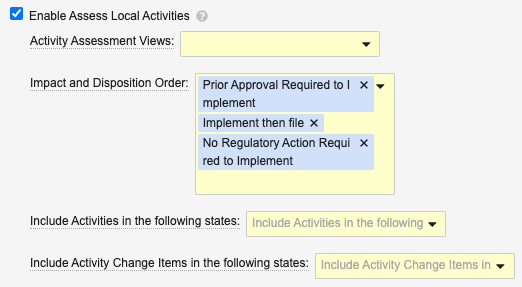
The first **Activity Assessment View** you select determines the default grouped view when Vault launches the viewer.
* **Grouped by Change Item** is necessary only in Registrations Vaults with the **Enable Grouping of Change Items by Product Family** [setting](/en/lr/53688/#grouping-of-change-items) enabled.
* When you select both **Grouped by Lead Market** and **Grouped by Change Item**, the default view is the one listed first.
**Impact and Disposition Order** controls the order in which Vault determines the priority order of the assessment, based on the *Local Disposition* picklist values. The first item will be considered the most restrictive. We recommend using the default values and ordering (**Prior Approval Required to Implement**, **Implement then file**, then **No Regulatory Action Required to Implement**) however you can add, remove, or re-order the default values as required. This controls a validation check with which Vault ensures the local disposition does not have a lower value than the individual impact fields.
**Include Activities in the following states** determines the *Activity *records Vault loads in the viewer, according to the record's lifecycle state. We recommend the *Planned*, *In Assessment*, *Not Applicable*, and *Impact Identified* states, however you may select other states according to your organization's requirements.
**Include Activity Change Items in the following states** determines the *Activity Change Item* records Vault loads in the viewer, according to the record's lifecycle state. We recommend the *Planned*, *In Assessment*, *Impact Identified*, and *Not Applicable* states, however you may select other states according to your organization's requirements.
## Limitations
* It is possible for multiple users to run the *Assess Local Activities* action simultaneously. See [additional details](/en/lr/929927/#simultaneous-assessment) on how this may impact your Vault's users.
* The Assess Local Activities viewer displays up to 2,000 rows in the grid, and up to 20 **Local Activity** columns. Similarly, users can fastfill up to 2,000 rows at a time.
## About RIM Object Configurations {#object-config}
Some aspects of the Assess Local Activities viewer are controlled via the **Update Display Order** property value of the `activity__v` and `activity_change_item__v` RIM Object Configurations.
These aspects include:
* Displaying filter chips for impact fields, for example *CMC Impact* (`cmc_impact__v`)
* Adding or removing columns in the grid
* The viewer's default columns, including lifecycle state columns
See additional details about working with [RIM Object Configurations](/en/lr/702685/).
## Related Permissions {#permissions}
Generally, Assess Local Activities viewer users must generally have *Read* and *Edit* permission on the records and fields they are attempting to view and/or edit in the viewer. This means the viewer behaves such that:
* *Activity* records (rows) and descendant *Activity Change Items* are shown only when the user is permitted to view them.
* Fields (columns) are shown only when a user is permitted to view it.
* Fields can only be edited when a user is permitted to *Edit* that field. When attempting to edit a nonpermitted field via fastfill, Vault fastfills only the permitted fields.
### Viewer Permissions {#viewer-perms}
Assess Local Activities users must be assigned a permission set with the below permissions in order to access the viewer generally.
| Permission Label | Permission | Controls |
|---|---|---|
| Objects: Activity: [all applicable object types] | Read | Ability to run the action from an Activity, plus filtering capabilities. |
| Objects: Activity: Object Field Permissions: Name | Read | Ability to run the action from an Activity |
| Objects: Activity: Object Field Permissions: Impacted Market | Read | Ability to access the viewer |
| Objects: Activity: Object Action Permissions: Assess Local Activities | View, Execute | Ability to run the action from an Activity |
| Objects: Activity Change Item: Object Field Permissions: All change item fields (including Activity Change Item) | Read | Ability to use the Change Item [grouping](/en/lr/53688/#grouping-of-change-items) view when enabled |
| Objects: Change Item: Change Item | Read | Ability to use the Change Item [grouping](/en/lr/53688/#grouping-of-change-items) view when enabled |
| Objects: Country | Read | Ability to access the viewer |
| Objects: Event: Object Action Permissions: Assess Local Activities | View, Execute | Ability to run the action from an Event |
| Pages: Assess Local Activities | View | Ability to access the viewer |
### Filter Permissions {#filter-perms}
Assess Local Activities users must be assigned a permission set with the below permissions in order to use the viewer's filtering options.
| Object Permission Label | Permission | Controls Ability to Filter By |
|---|---|---|
| Application | Read | Related Application |
| Change Item: Object Permissions: Change Item | Read | Change Item |
| Container | Read | Container |
| Activity: Object Field Permissions: Artwork Impact, CMC Impact, Labeling Impact, Other Impact | Read | Corresponding viewer filter chips |
| Activity: Object Field Permissions: Impacted Market (`impacted_market__rim`) | Read | Impacted Market |
| Activity Change Item: Object Field Permissions: Artwork Impact, CMC Impact, Labeling Impact, Other Impact | Read | Corresponding viewer filter chips |
| Activity Change Item: Object Field Permissions: Change Item | Read | Change Item |
| Activity Change Item: Object Field Permissions: Product (`product__v`) | Read | Product Family, Product Variant, Packaging |
| Activity Change Item: Object Field Permissions: Product Variant (`product_variant__v`) | Read | Product Variant, Packaging |
| Activity Change Item: Object Field Permissions: Packaging | Read | Container |
| Activity Change Item: Object Permissions: [at least one object type] | Read | Product, Product Variant, Container, Packaging, Change Item |
| Country | Read | Impacted Market |
| Event: Object Field Permissions: Impacted Product Family (`impacted_product__rim`) | Read | Product, Product Family, Product Variant |
| Packaging | Read | Packaging |
| Packaging: Object Field Permissions: Product, Product Variant | Read | Packaging |
| Packaging Container | Read | Container |
| Product | Read | Product, Product Variant |
| Product Family | Read | Product, Product Family, Product Variant |
| Product Family Application | Read | Product, Product Family, Product Variant |
| Product Family Product | Read | Product Family, Product Variant |
| Product Packaging | Read | Packaging |
| Product Variant | Read | Product Variant |
| Product Variant: Object Field Permissions: Product | Read | Product Variant |
| Product Variant Packaging | Read | Packaging |
| Registration | Read | Registration |
[1]: #app-settings
[2]: #permissions