# Configuration for Bulk Creating & Managing Event Details

Creating an _Event_ record is the recommended first step for many regulatory processes, as the records containing details pertaining to the event itself (such as the impacted product and its product variants, plus various types of packaging and their shelf life details) serve as the initial entry point for regulatory data that is eventually used across similar records for impacted markets via regulatory objectives and submissions.

The Create & Manage Event Details wizard provides a guided user interface for creating, updating, replacing, and withdrawing details in a few steps: Users can launch the wizard from an _Event_ record, select one or more applicable changes (for example, adding new _Drug Packaging_ details and withdrawing another), populate the required information, then review and confirm the results in a simplified view.

Along with the [Create Related Records](/en/lr/59835/) wizard for managing these details later in the process across impacted markets, bulk _Event_ detail management greatly reduces repetitive data entry, increasing efficiency and enhancing data integrity.


<div class="note-border alert-info">
  <div class="alert alert-info" role="alert">
    <div><i class="far fa-info-circle"></i></div>
    <div class="alert-text">
      <p><strong>Note</strong>: The <a href="/en/lr/5498722/">Create &amp; Manage Event Details</a> wizard is only available for RIM Registrations.</p>
    </div>
  </div>
</div>


## Configuration Overview

To set up bulk _Event_ detail creation and management in your Vault:

1. Configure fields and page layouts for the various included _Event_, _Submission_, and _Regulatory Objective_ relationship objects. See [Configuring Relationship Objects][2] for more information.
2. Configure the _Event_ object and object lifecycle with the supporting object actions and state types. See [Configuring the Event Object Lifecycle & Actions][3] for details.
3. Update and confirm [Admin and user permissions][12] for working with the wizard and its various records.
4. Update the Veeva-provided Event Change Details records relevant to your organization, or create your own. See [About Event Change Types & Details][6] and [Managing Event Change Types & Details][9] for more information.
5. Optional: Enable *Change Item* grouping. This assists RIM users in assessing and dispositioning single changes that involve many products and/or packaging types by grouping records by *Product Family* within the Create & Manage Event Details wizard. To enable this feature:
    * Activate the *Change Item* object type within the *Change Item*, *Event Change Item*, *Activity Change Item* objects and ensure users are assigned Read, Create, and Edit permissions for these objects via assigned permission sets.
    * Navigate to **Admin > Settings > Application Settings** and select the **Enable Grouping of Change Items by Product Family** [Application Setting](/en/lr/53688/#grouping-of-change-items).

### Supporting Event Change Items & Labeling Concepts {#supporting-event-change-items-and-labeling-concepts}

When gathering an event's details, wizard users may want to be able to include the _Event_'s related _Change Items_ and, optionally, any [_Labeling Concepts_](/en/lr/73989/) related to those items.

To enable this capability for _Change Items_:

1. Activate the following [Event Change Details][8] and update them according to your organization's requirements:
    * Product Change Details
    * Packaging Change Details
    * Labeling Concept Details
2. Add the Event Change Details you activated in Step 1 to the desired [Event Change Types][7]. We recommend that Product Change Details and Packaging Change Details are arranged such that they are the first details listed within the selected type.
3. Navigate to **Admin > Settings > Application Settings** and enable the **Exclude change item lifecycle states from Create Event Details** setting by selecting the _Change Item_ object **Lifecycle States** which Vault should filter when selecting items to display in the wizard. Your selections depend on your organization's requirements, however we recommend selecting the below states.
    * Approved, Ready for Implementation
    * Cancelled
    * Completed
    * Inactive
    * Not Applicable
    * Not Approved
    * Partially Approved
    * Planned
4. Review the **Allow creation of change items in Create Event Details** Application Setting. This setting is enabled by default but can be disabled at any time, for example to allow the Quality-RIM Vault Connection to create these records instead.
5. If your configuration allows users to create _Change Items_, navigate to **Admin > Configuration > [RIM Object Configurations](/en/lr/702685/)** and locate the **change_item__v** configuration.
    * Add any custom (`__c`) fields as desired, setting the **Create Display Order** Registrations Setting accordingly.
    * Review the default **RIM Field Configurations** and adjust the **Create Display Order** as needed.

If your organization uses [_Labeling Concepts_](/en/lr/73989/), review the _Origin_ picklist values and related _Labeling Concept_ object field configuration. To fit your organization's requirements for _Labeling Concepts_, you can add any custom values and/or inactivate the provided standard (`__v`) values. You may also consider requiring the corresponding field within the _Labeling Concept_ object by selecting the **User must always enter a value (required)** configuration option.


## Configuring Relationship Objects {#configuring-relationship-objects}

Various _Event_, _Submission_, and _Regulatory Objective_ relationship objects require configuration per the below. See [Relationship Object Inventory][18] for the full listing of all in-scope objects.

  1. The wizard references the various impacted relationship objects via the Event Change Type's _Related Change Type_ field. To configure this, add the _Related Change Type_ picklist field to all _Event_, _Submission_, and _Regulatory Objective_ relationship objects, as well as their page layouts. See [Relationship Object Inventory][18] for the full listing.
  2. For _Event_ relationship objects only: For the _Name_ field, select the _System manages field value (read-only)_ configuration option.


##  Configuring the Event Object Lifecycle & Actions {#configuring-the-event-object-lifecycle-and-actions}

The _Event_ object lifecycle requires you to configure select _Event_ object actions, then add them to the desired object lifecycle states to allow users to execute them from an _Event_ record. You must also configure an _In Review_ lifecycle state, which allows users to [generate a preview](/en/lr/5498722/#event-lifecycle-actions) of their changes.

### Configuring Event Object Actions

Within the _Event_ object, [create](/en/lr/43127/) the following object actions, or ensure they are active:
  * Create Event Details
  * Manage Event Details
  * Review Event Details
  * Clear Preview

### Configuring the Event Object Lifecycle

To configure your Vault's _Event_ object lifecycle for bulk detail creation:

  1. If not already configured for the [Create Related Records](/en/lr/59835/) wizard, create an _In Data Review_ state, then map it to the _In Data Review_ state type.
  2. Configure user actions for _Create Event Details_ and _Manage Event Details_ in any lifecycle state, except for _In Data Review_.
  3. Configure the following user actions in the _In Data Review_ state:
      * _Review Event Details_
      * _Clear Preview_, if not already configured for creating related records.


## About Event Change Types & Details {#about-event-change-types-and-details}

Event Change Type and Event Change Detail configuration records are mandatory for creating and managing _Event_ details in bulk, and they determine whether and how users complete fields in the wizard.

While your organization may require additional Event Change Types or Event Change Details, Veeva provides sample records as a starting point. See [Managing Event Change Types & Details][9] for specific instructions on how to update the Veeva-provided records, or create your own.


### About Event Change Types {#about-event-change-types}

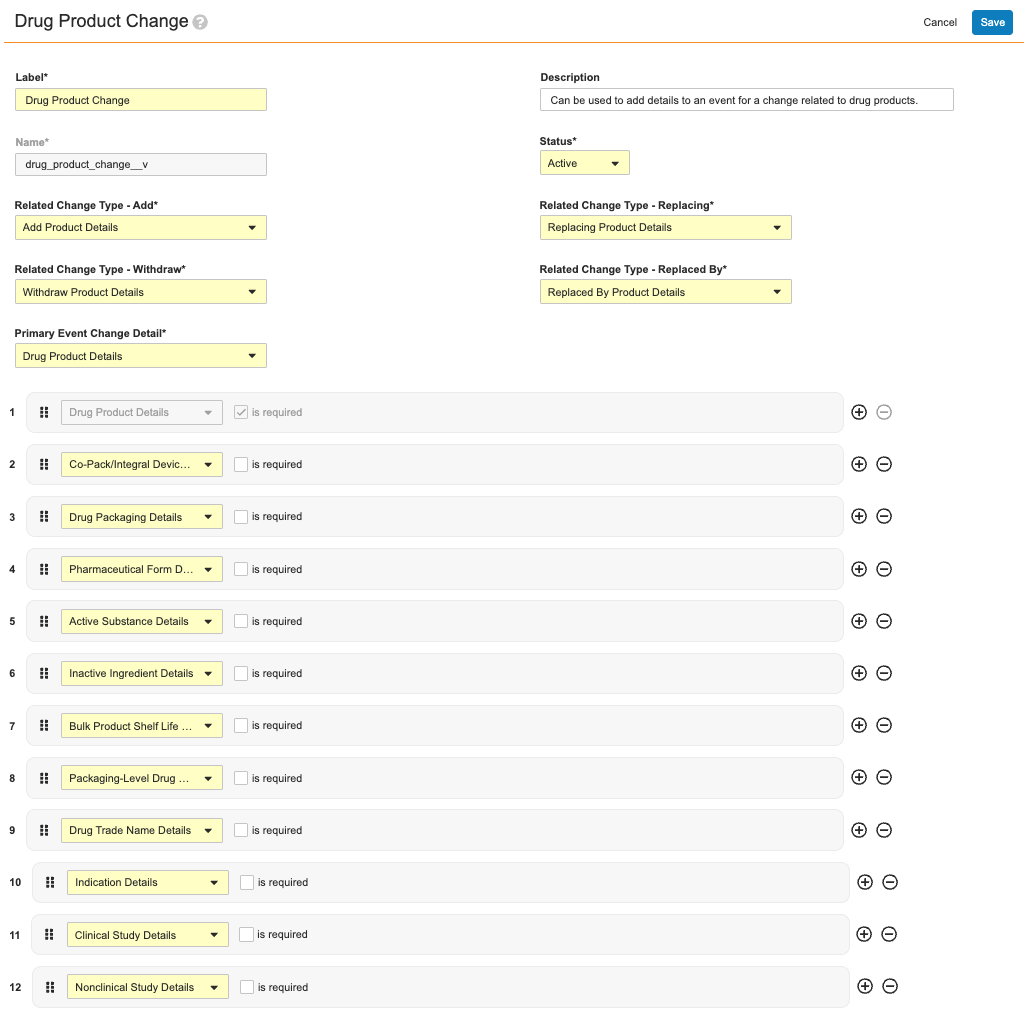
Event Change Types define the required and optional details for a specific kind of change. For example, the _Drug Product Change_ Event Change Type record defines:

  * Users' ability to add, withdraw, and replace details for an event change related to drug products in general, as defined by the _Related Change Type_ fields (_Add_, _Withdraw_, _Replacing_, and _Replaced by_).
  * The primary and additional Event Change Details to be referenced by the wizard during processing. In this example, the _Drug Product Details_ record is populated in this type's _Primary Event Change Detail_ field, and therefore the defined details must always be collected from users in the wizard. Conversely, the 11 remaining Change Details are not required, and are therefore at users' discretion when working in the wizard.

<a href="https://platform.veevavault.help/assets/images/cmed-admin-about-event-change-types.png" data-lightbox="cmed" data-title="" data-alt="event change type record">
  <img class="docimage" src="https://platform.veevavault.help/assets/images/cmed-admin-about-event-change-types.png" alt="event change type record" style="max-width: 50%;width: 600px;"  />
</a>

###  About Event Change Details {#about-event-change-details}

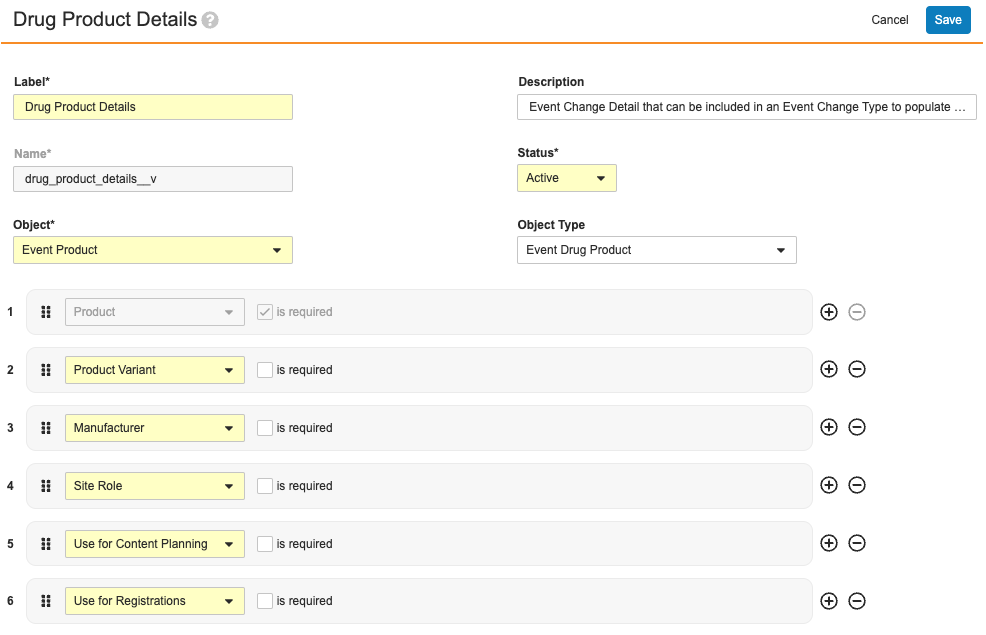
Event Change Details are the building blocks of Event Change Types: A single Event Change Detail record specifies the _Event_ relationship object (and its object types, where applicable) containing the field data to be collected in the wizard.

As illustrated in About Event Change Types, a single _Drug Product Change_ Event Change Type record includes:

  * One required Event Change Details record, _Drug Product Details_
  * 11 optional Event Change Details records.

Of these, each defines their own set of required and optional fields. For example, the _Drug Product Details_ record shown below specifies that the _Product_ field is required, and the remaining are optional.
<a href="https://platform.veevavault.help/assets/images/cmed-admin-about-event-change-details.png" data-lightbox="cmed" data-title="" data-alt="event change details record">
  <img class="docimage" src="https://platform.veevavault.help/assets/images/cmed-admin-about-event-change-details.png" alt="event change details record" style="max-width: 50%;width: 600px;"  />
</a>


<div class="note-border alert-info">
  <div class="alert alert-info" role="alert">
    <div><i class="far fa-info-circle"></i></div>
    <div class="alert-text">
      <p><strong>Note</strong>: When a given field is required for an <em>Event</em> relationship object, the field is automatically required when configuring a corresponding Event Change Detail. Conversely, when an Event Change Detail record requires a field that the object field configuration defines as optional, the wizard requires the field according to the Event Change Detail.</p>
    </div>
  </div>
</div>


## Managing Event Change Types & Details {#managing-event-change-types-and-details}

While your organization may require additional Event Change Types or Event Change Details, Veeva provides sample records as a starting point. The sections below discuss general guidelines for these records, all of which apply when updating the delivered records or creating your own.


<div class="note-border alert-info">
  <div class="alert alert-info" role="alert">
    <div><i class="far fa-info-circle"></i></div>
    <div class="alert-text">
      <p><strong>Note</strong>: When creating new Event Change Types, you must first create at least one corresponding Event Change Detail, as this is a required field.</p>
    </div>
  </div>
</div>


### Navigation

Event Change Types and Event Change Details are both located in **Admin > Configuration > Application Configurations > Registrations Setup**:

  * The **Event Change Types - View** and **Event Change Details - View** options display all such existing records. Select a record's **Name**, then **Edit** from the record's **Actions** menu, or click **+ Create** to create a new record.
  * The **Event Change Types - Create** and **Event Change Details - Create** options allow you to immediately create that record.


### Working with Event Change Types & Details {#working-with-ect-details}

Except where indicated, both record types require or allow you to populate the following fields:

* The **Label** and **Name** are required for identifying the record in the Admin UI. You cannot update the **Name** field after saving the record. Optionally, add a **Description** for additional clarity on the record's use in your Vault's configuration.
* The **Status** field must be set to **Active** in order for the wizard to consider the record.
* For Event Change Types only:
    * [**Related Change Type**](/en/lr/5498722/#change-types) fields correspond to the _Related Change Type_ picklist. You can re-label or inactivate this picklist's standard values, however you cannot create custom ones. Additionally, at least one picklist value must remain active in order for users to load the wizard.
    * **Primary Event Change Detail** references a single Event Change Detail record.
    * Once you've populated the record's required fields, Vault pre-populates the _Primary Event Change Detail_ and its sibling Change Detail records. Select the **is required** checkbox to require that the referenced Change Detail is processed in the wizard.
* For Event Change Details only:
    * The **Object** dropdown includes all _Event_ relationship objects, and when applicable, the **Object Type** dropdown includes the selected object's object types.
    * Once you've populated the record's required fields, Vault pre-populates the selected object or object type's required fields, according to their field configuration. When field configuration does not take precedence, you can select or deselect the **is required** checkbox. When a field is required in the Event Change Type record, users must complete this field when using the wizard.


##  Related Permissions {#related-permissions}

### Admin Permissions

In order to set up Event Change Type and Event Change Detail records, Admins must have a permission set with **Metadata API** permission, located in the permission set's **Application** tab.

Admins without this permission receive a Page Not Found error when attempting to work with Event Change Types or Event Change Details in **Admin > Configuration > Application Configurations > Registrations Setup**.


### User Permissions

#### Event Object Actions

Users must be assigned to a role with _Execute_ access in all applicable _Event_ lifecycle states for the following actions:

  * Create Event Details
  * Manage Event Details
  * Review Event Details
  * Clear Preview

#### Objects, Object Types, and Fields

Vault presents data to users according to their permissions for the objects, object types, and fields referenced in the underlying Event Change Type and Event Change Detail configuration records.

For example, the _Active Substance Change_ Event Change Type and its primary Event Change Detail (_Active Substance Details_) specify the _Event Active Substance_ object's _Active Substance_ field as required. This means a user's permission set must include, at minimum:

* _Read_ permission for the _Event_ object and its applicable object types
* _Create_ permission for the _Event Active Substance_ relationship object
* _Edit_ permissions for the _Active Substance_ field in the _Event Active Substance_ object.


## About Relationship Objects {#about-relationship-objects}

All Vault-generated and -managed event details are considered to be _Event_ relationship (or "join") object records. Each _Event_ relationship record includes the relevant data for a particular event. For example, an _Event Shelf Life or Condition_ record includes the _Product_, _Product Variant_, _Packaging_, _Shelf Life_, _Storage Condition_, and other information for the _Event_ record to which it is related.

This logic similarly applies to the _Submission_ and _Regulatory Objective_ relationship records referenced by this and the Create Related Records wizard.


<div class="note-border alert-info">
  <div class="alert alert-info" role="alert">
    <div><i class="far fa-info-circle"></i></div>
    <div class="alert-text">
      <p><strong>Note</strong>: <em>Event</em> relationship records are distinct from the Event Change Type and Event Change Detail configuration records required to create them. See <a href="/en/lr/549872/#about-event-change-types-and-details">About Event Change Types &amp; Details</a> for more information.</p>
    </div>
  </div>
</div>


### Relationship Object Inventory {#relationship-object-inventory}

The list below details all objects which are related or joined to the _Event_ object. References to an _Event_ relationship or detail record on this page refer to any such record in the list, unless otherwise specified.

For example, the _Active Substance_ object is related via the _Event Active Substance_ object found in **Admin > Configuration > Objects**.

  * Active Substance
  * Authorization
  * Change Item
  * Clinical Study
  * Inactive Ingredient
  * Indication
  * Nonclinical Study
  * Packaging
  * Packaging Characteristic
  * Pharmaceutical Form
  * Product
  * Product Characteristic
  * Nomenclature Code (`classification__v`)
  * Regulatory Text
  * Shelf Life or Condition (`shelf_life__rim`)
  * Site Contact
  * Site Organization
  * Site Role

This feature also uses the _Event Change Item Labeling Concept_ relationship object, relating _Event Change Items_ to _Labeling Concepts_.

Similarly, this inventory applies to _Submission_ and _Regulatory Objective_ relationships, for example _Submission Active Substance_ and _Regulatory Objective Active Substance_.

[2]: #configuring-relationship-objects
[3]: #configuring-the-event-object-lifecycle-and-actions
[6]: #about-event-change-types-and-details
[7]: #about-event-change-types
[8]: #about-event-change-details
[9]: #managing-event-change-types-and-details
[12]: #related-permissions
[17]: #about-relationship-objects
[18]: #relationship-object-inventory
