When creating or updating records in bulk, the Create Related Records wizard validates Event data against existing Registration and Application records before creating any new records. Along with the relevant Application Settings, Vault uses several types of validation logic to ensure the wizard does not create invalid or duplicate records.
Note: This article is intended for RIM Registrations users to understand how and when the Create Related Records wizard validates records and metadata in certain configuration scenarios. It does not detail all cases of validation in RIM Registrations nor other Veeva RIM applications, except where noted.
Create Related Records Validation Flow
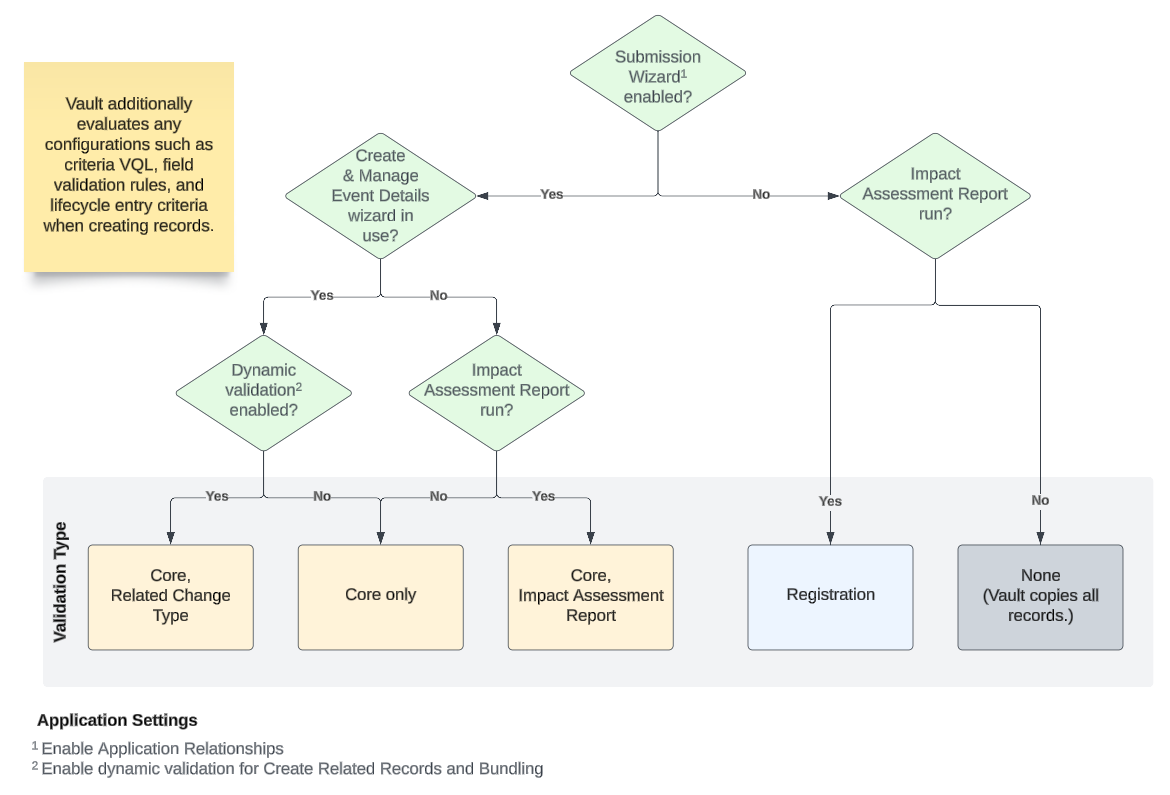
The flow diagram below summarizes the Create Related Records wizard logic it follows when determining which type(s) of validation apply:
Core Validation
Core validation applies in all cases when the Submission Wizard (Enable Application Relationships) is enabled and the Create & Manage Event Details wizard is in use. Core validation additionally occurs alongside Related Change Type (when dynamic validation is enabled) or Impact Assessment Report validation (when a user launches the Create Related Records wizard from an Impact Assessment Report).
Core Validation Logic
Core validation cycles through exact, wildcard, and inactive record matches. When multiple matches are found, Vault flags them for review within the preview (when used) or otherwise copies all existing matching records from the Application to the resulting Regulatory Objective or Submission.
- When there is not an exact match, Vault treats any blank Event record fields to find a wildcard match.
- When a match is still not found, Vault looks for an exact match within inactive records on the Application. When at least one inactive record exists, Vault deselects it in the preview and flags it with a warning. When preview is not in use, Vault does not create any records.
Vault also runs core validation when bundling Activities and Regulatory Objectives and when splitting Activities or Regulatory Objectives.
Impact Assessment Report Validation
Along with core validation, Impact Assessment Report (IAR) validation applies when:
- The Submission Wizard (Enable Application Relationships) is enabled.
- The Create & Manage Event Details wizard is not in use.
- A user launches the Create Related Records wizard from an Impact Assessment Report.
IAR Validation Logic
IAR validation specifies field values and object types Vault reviews based on Submission and Regulatory Objective relationship records. See additional details on IAR validation.
Related Change Type Validation
Related Change Type (RCT) validation applies only when dynamic validation is enabled.
RCT Validation Logic
Related Change Type validation logic confirms that a required parent or supporting record exists on the Application before the wizard creates a new record. This logic references a record’s Related Change Type value previously set by the Create & Manage Event Details wizard for the selected add, replace, update, or withdraw change type.
Registration Validation
Vault applies Registration validation only when the Create & Manage Event Details wizard is not in use.
Registration Validation Logic
Vault first determines whether this Registration validation applies by confirming the Registration object type: Registration validation applies for all Registration object types except Site Registration. Then, Vault gathers a list of core data, or the Products, Product Variants, and Packaging records that are related to the Registered Product for each Registration within the Impact Assessment Report.
Finally, Vault validates the new, in-scope Event relationship records against the core data list by minimally checking for high-level, contextual relationships rather than requiring an exact match. For example, an Event Product has both Product and Product Variant values, and the core data list includes three Products, one for each of three Product Variants:
| Product | Product Variant | |
|---|---|---|
| Event Product | P-001 | PV-A |
| Core data Product | P-001 | PV-A |
| Core data Product | P-001 | PV-B |
| Core data Product | P-002 | PV-C |
When Vault validates new Regulatory Objective Product and Submission Product records, it references Event Product P-001 and checks whether its exact Product and Product Variant values match a valid record from the core data list. Because there is an exact match, Vault creates the target records.
In the event Vault does not locate an exact match, it will instead make a contextual match. Using the example above, suppose Event Product P-001 instead references a PV-D Product Variant. Because the core data list does not include the PV-D variant, Vault instead verifies that the Primary Product Family associated with P-001 is a Product Family which is already linked to the Application. In order to create the new Regulatory Objective Product and Submission Product records, the Event Product’s related Product (P-001) must reference the same Primary Product Family as the Application.
Vault creates new Regulatory Objective and Submission relationship records when it locates matching values across the below records and fields.
| Event Relationship Record | Core Data Record(s) | Core Data Field(s) | Additional Checks |
|---|---|---|---|
| Event Packaging | Product, Product Variant | packaging_product_detail__rimpharma_product_packaging__rim |
None |
| Event Active Substance | Product Variant | product_detail_active_substance__rim |
For Active Substance Registrations, there is an additional check to verify whether the Event Active Substance’s primary product family is valid for the Application via the Product Family Application relationship. |
| Event Inactive Ingredient | Product Variant | product_detail_inactive_ingredient__rim |
None |
| Event Clinical Study | Product Family referenced by the target Application | product_clinical_study__rimproduct_application__rim |
None |
| Event Nonclinical Study | Product Family referenced by the target Application | product_nonclinical_study__rimproduct_application__rim |
None |