Local Activity Assessment provides RIM Registrations users with an easy way to locate and disposition all Activity Change Items for which they are responsible. With a clear view of the remaining work to be completed and a conclusive indication when the changes are complete, users such as labeling specialists and CMC strategists can rely on this feature to easily capture the assessment of the change.
Note: Local Activity Assessment can be configured in RIM Registrations Vaults only.
Configuring Local Activity Assessment
To configure the Enable Local Activities viewer:
- Enable the Enable Assess Local Activities Registrations setting. See additional details about the required subsettings. The setting must be enabled in order to configure the remaining components.
- Review your Vault’s Event object lifecycle configuration. For each relevant lifecycle state, configure a user action using the “Assess Local Activities” action. We recommend using the In Assessment state.
- Review your Vault’s security configuration and ensure users are assigned the appropriate permissions to use this feature.
Configuring Application Settings
In Admin > Settings > Application Settings, the Enable Assess Local Activities Registrations setting controls the feature overall. Once enabled, you must populate all subsettings.
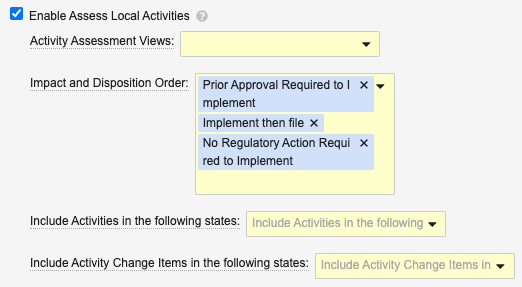
The first Activity Assessment View you select determines the default grouped view when Vault launches the viewer.
- Grouped by Change Item is necessary only in Registrations Vaults with the Enable Grouping of Change Items by Product Family setting enabled.
- When you select both Grouped by Lead Market and Grouped by Change Item, the default view is the one listed first.
Impact and Disposition Order controls the order in which Vault determines the priority order of the assessment, based on the Local Disposition picklist values. The first item will be considered the most restrictive. We recommend using the default values and ordering (Prior Approval Required to Implement, Implement then file, then No Regulatory Action Required to Implement) however you can add, remove, or re-order the default values as required. This controls a validation check with which Vault ensures the local disposition does not have a lower value than the individual impact fields.
Include Activities in the following states determines the Activity *records Vault loads in the viewer, according to the record’s lifecycle state. We recommend the *Planned, In Assessment, Not Applicable, and Impact Identified states, however you may select other states according to your organization’s requirements.
Include Activity Change Items in the following states determines the Activity Change Item records Vault loads in the viewer, according to the record’s lifecycle state. We recommend the Planned, In Assessment, Impact Identified, and Not Applicable states, however you may select other states according to your organization’s requirements.
Limitations
- It is possible for multiple users to run the Assess Local Activities action simultaneously. See additional details on how this may impact your Vault’s users.
- The Assess Local Activities viewer displays up to 2,000 rows in the grid, and up to 20 Local Activity columns. Similarly, users can fastfill up to 2,000 rows at a time.
About RIM Object Configurations
Some aspects of the Assess Local Activities viewer are controlled via the Update Display Order property value of the activity__v and activity_change_item__v RIM Object Configurations.
These aspects include:
- Displaying filter chips for impact fields, for example CMC Impact (
cmc_impact__v) - Adding or removing columns in the grid
- The viewer’s default columns, including lifecycle state columns
See additional details about working with RIM Object Configurations.
Related Permissions
Generally, Assess Local Activities viewer users must generally have Read and Edit permission on the records and fields they are attempting to view and/or edit in the viewer. This means the viewer behaves such that:
- Activity records (rows) and descendant Activity Change Items are shown only when the user is permitted to view them.
- Fields (columns) are shown only when a user is permitted to view it.
- Fields can only be edited when a user is permitted to Edit that field. When attempting to edit a nonpermitted field via fastfill, Vault fastfills only the permitted fields.
Viewer Permissions
Assess Local Activities users must be assigned a permission set with the below permissions in order to access the viewer generally.
| Permission Label | Permission | Controls |
|---|---|---|
| Objects: Activity: [all applicable object types] | Read | Ability to run the action from an Activity, plus filtering capabilities. |
| Objects: Activity: Object Field Permissions: Name | Read | Ability to run the action from an Activity |
| Objects: Activity: Object Field Permissions: Impacted Market | Read | Ability to access the viewer |
| Objects: Activity: Object Action Permissions: Assess Local Activities | View, Execute | Ability to run the action from an Activity |
| Objects: Activity Change Item: Object Field Permissions: All change item fields (including Activity Change Item) | Read | Ability to use the Change Item grouping view when enabled |
| Objects: Change Item: Change Item | Read | Ability to use the Change Item grouping view when enabled |
| Objects: Country | Read | Ability to access the viewer |
| Objects: Event: Object Action Permissions: Assess Local Activities | View, Execute | Ability to run the action from an Event |
| Pages: Assess Local Activities | View | Ability to access the viewer |
Filter Permissions
Assess Local Activities users must be assigned a permission set with the below permissions in order to use the viewer’s filtering options.
| Object Permission Label | Permission | Controls Ability to Filter By |
|---|---|---|
| Application | Read | Related Application |
| Change Item: Object Permissions: Change Item | Read | Change Item |
| Container | Read | Container |
| Activity: Object Field Permissions: Artwork Impact, CMC Impact, Labeling Impact, Other Impact | Read | Corresponding viewer filter chips |
Activity: Object Field Permissions: Impacted Market (impacted_market__rim) |
Read | Impacted Market |
| Activity Change Item: Object Field Permissions: Artwork Impact, CMC Impact, Labeling Impact, Other Impact | Read | Corresponding viewer filter chips |
| Activity Change Item: Object Field Permissions: Change Item | Read | Change Item |
Activity Change Item: Object Field Permissions: Product (product__v) |
Read | Product Family, Product Variant, Packaging |
Activity Change Item: Object Field Permissions: Product Variant (product_variant__v) |
Read | Product Variant, Packaging |
| Activity Change Item: Object Field Permissions: Packaging | Read | Container |
| Activity Change Item: Object Permissions: [at least one object type] | Read | Product, Product Variant, Container, Packaging, Change Item |
| Country | Read | Impacted Market |
Event: Object Field Permissions: Impacted Product Family (impacted_product__rim) |
Read | Product, Product Family, Product Variant |
| Packaging | Read | Packaging |
| Packaging: Object Field Permissions: Product, Product Variant | Read | Packaging |
| Packaging Container | Read | Container |
| Product | Read | Product, Product Variant |
| Product Family | Read | Product, Product Family, Product Variant |
| Product Family Application | Read | Product, Product Family, Product Variant |
| Product Family Product | Read | Product Family, Product Variant |
| Product Packaging | Read | Packaging |
| Product Variant | Read | Product Variant |
| Product Variant: Object Field Permissions: Product | Read | Product Variant |
| Product Variant Packaging | Read | Packaging |
| Registration | Read | Registration |