RIM Registrations includes several bulk actions and wizards to manage Events, however users must manually identify which action to run and when to run it based on the current state of their data. This manual process can lead to skipped steps or confusion about the optimal order of operations, especially for infrequent users. Guided Event Actions provide dynamic, context-aware badges directly on the Event record page layout to guide users through the end-to-end event management lifecycle.
Note: Guided Event Actions are automatically available in RIM Registrations Vaults upon configuration of the supported RIM feature.
Accessing Guided Event Actions
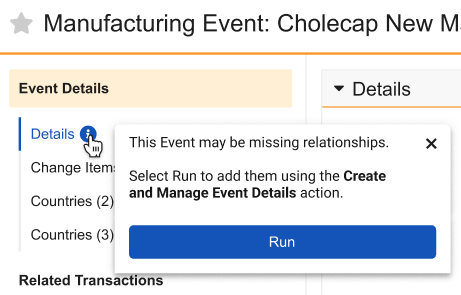
Guided Event Actions are an interactive informational badge next to object fields or section headers on an Event object record detail page. When a user clicks the badge, Vault displays a dialog with explicit guidance on how to proceed. Guided Event Actions may additionally provide options to immediately run corresponding actions as applicable.
For example, for a Manufacturing Event record in the Planned state that is missing relationships, the Guided Event Action directs users to the next steps in the event management process: Clicking Run to launch the Create & Manage Event Details wizard.
See additional details about supported actions and the conditions required to see them.
Supported Actions & Conditions
Reference the table below for the RIM features that include Guided Event Actions. See additional details on understanding the Vault configurations that control the indicated Record Condition, as well as overall limitations.
| RIM Feature | Action | Event Record Section Header | Record Conditions |
|---|---|---|---|
| Create & Managing Event Details (CMED) | Create Event Details | Details | The Event does not have any active Change Items, nor any active relationships. |
| Update Local Regulatory Information (ULRI) | Update Local Regulatory Information | Details | The Event meets standard criteria for local updates, AND there is at least one active item or relationship that has never been sent to impacted markets. Additionally, the active item cannot currently be In Data Review. See also Priority Rules. |
| Create Related Records (CRR) | Create Related Records (from an Event or Impact Assessment Report) | Activities | The Event has active relationships or change items, BUT zero Activities, zero Regulatory Objectives, and zero Submissions. See also Priority Rules. |
| Regulatory Objectives | The Event has active items or relationships AND at least one Activity, BUT is still missing either Regulatory Objectives or Submissions (or both). See also Priority Rules. | ||
| Local Activity Assessment | Assess Local Activities (ALA) | Activities | There is at least one related Activity sitting in a status that requires assessment, based on a related Application Setting. |
| Global Content Planning (GCP) | Create Global Content Plan | Global Content Plan | The Global Content Plan field is blank and at least one relationship is flagged as Use for Content Plan = "Yes". See also Priority Rules. |
About Priority Rules
For some actions, Vault applies priority rules when multiple conditions are met within the same section or across related functions:
- Update Local Regulatory Information & Create Related Records: When both conditions are met, Vault only displays the Create Related Records action.
- Update Local Regulatory Information & Create Global Content Plan: When both conditions are met, Vault displays only the Update Local Regulatory Information action.
Vault Configuration Conditions
Guided Event Actions require that Event records meet certain conditions in order for users to see them. These conditions are supported by the sample Event lifecycle and Vault security configurations outlined below.
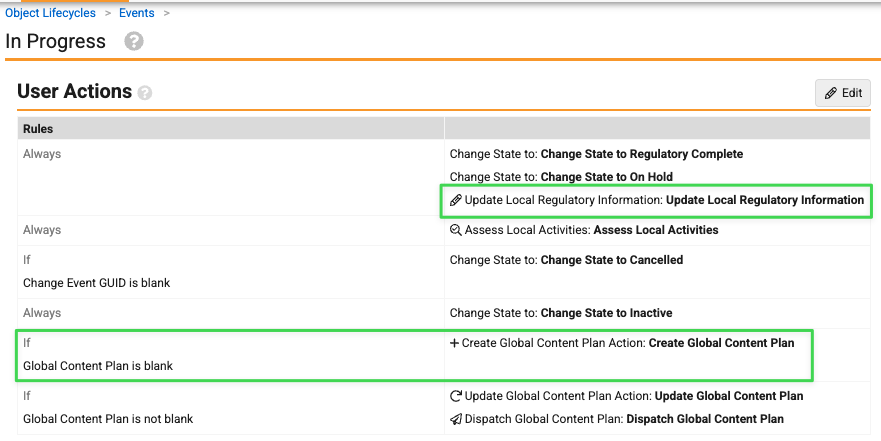
- An Event record must be in the lifecycle state in which the action is configured, for example, the Update Local Regulatory Information action is configured on the In Progress state. See example below.
- The Event record must meet the criteria for the action to appear. For example, the Create Global Content Plan action only appears If Global Content Plan is blank.
-
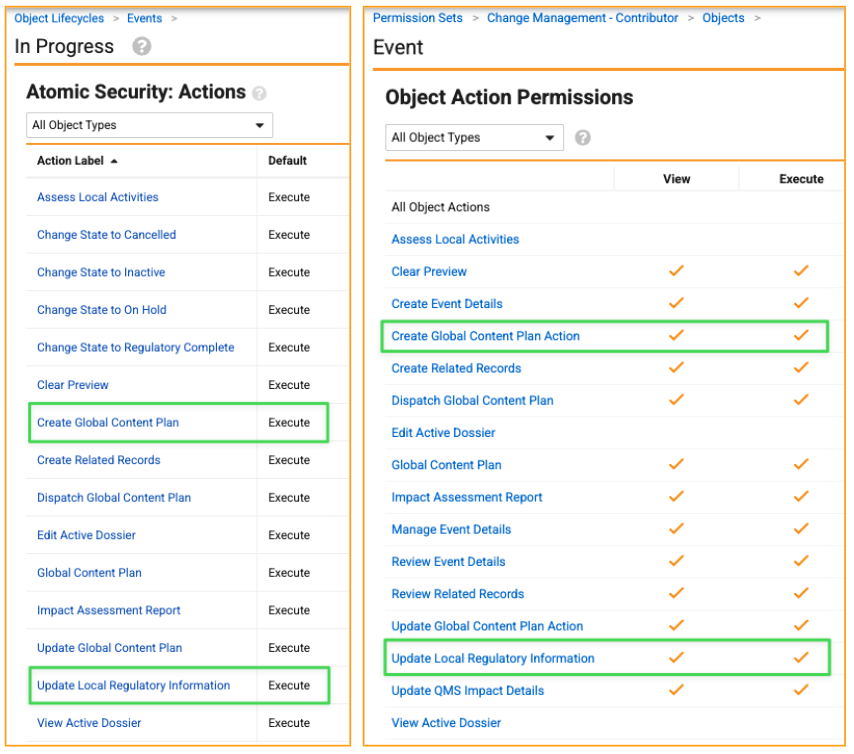
- The relevant Event lifecycle state’s Atomic Security: Actions permissions must allow users to execute the action generally, and users must be assigned a permission set that similarly includes the appropriate Object Action Permissions. In the example configuration shown here, the Event lifecycle’s In Progress state default configuration allows action execution by any user, and this custom Change Management - Contributor permission set’s Object Action Permissions control a user’s ability to execute both the Update Local Regulatory Information and Create Global Content Plan actions.
-
Limitations
- Guided Event Actions are exclusive to the Event object (
event__rim). Vault does not display badges for other objects, such as stand-alone Submissions or Regulatory Objectives. - Guided Event Actions are supported only for the various in-scope RIM wizards and their related standard actions.
- Badges only highlight process gaps and provide links to actions. They do not create or update records without direct user interaction.
- Vault only evaluates whether to display a badge upon loading or refreshing an Event record page. Event record updates alone do not prompt Vault to display a badge.
Related Permissions
Vault only displays badges only to users with Execute permission for the underlying action, whether via Atomic Security on the Event lifecycle, or within their assigned permissions set. Generally, when an action is configured in a lifecycle state but its entry action or execution conditions are not met on the individual record, Vault does not display it. See additional details about these Vault configurations.